---
title: "LumiScan Area Detector"
description: "LumiScan Area Detector finds regions in camera images and reports count, area and position. For coverage, contamination, fill-level and counting checks."
product: "LumiScan Area Detector"
component: "lumiscan-area-detector"
version: "1.2.0"
display_version: "1.2.0.6"
latest_version: true
language: "en"
url: "https://docs.hdvisionsystems.com/en/lumiscan-area-detector/1.2.0/index.html"
---
# LumiScan Area Detector
| | | |
| --- | --- | --- |
| 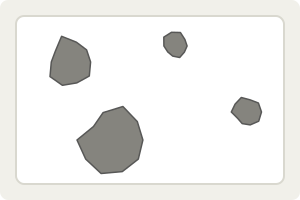
**Point it at the scene.** No reference picture: say what counts as a region. | 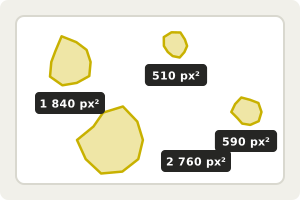
**Every region is found and measured.** With its area and position in the image. | Example result
Regions
4
Total area
5 700 px²
Largest
2 760 px²
**Hand the result to your PLC.** Count, total area and largest region. |
LumiScan Area Detector finds regions in a camera image and reports how big each one is. It needs no reference picture: you describe what counts as a region, by brightness, dark or light, with or without holes, and it returns every region with its area and position plus the count and total area. Use it for counting parts, checking coverage or contamination and measuring fill levels, or for things with no fixed shape such as a spill, a scratch or a gap.
For licensing, see [Licence](https://docs.hdvisionsystems.com/en/lumiscan-area-detector/1.2.0/lumiscan-area-detector/requirements.html#licence). Questions? See the [FAQ](https://docs.hdvisionsystems.com/en/lumiscan-area-detector/1.2.0/faq.html). A problem or an error message? See [Troubleshooting](https://docs.hdvisionsystems.com/en/lumiscan-area-detector/1.2.0/troubleshooting.html).