---
title: "LumiScan Cam Driver"
description: "LumiScan Cam Driver connects GenICam/GigE Vision cameras to ctrlX OS or a PC and publishes their images and camera functions for all LumiScan vision apps."
product: "LumiScan Cam Driver"
component: "lumiscan-cam-driver"
version: "2.2.1"
display_version: "2.2.1.10"
latest_version: true
language: "en"
url: "https://docs.hdvisionsystems.com/en/lumiscan-cam-driver/2.2.1/index.html"
---
# LumiScan Cam Driver
| | | |
| --- | --- | --- |
| 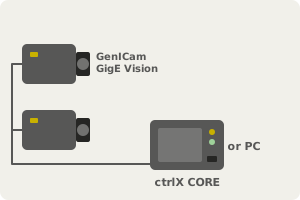
**Connect your GenICam cameras.** GigE Vision cameras on ctrlX CORE or a PC. | 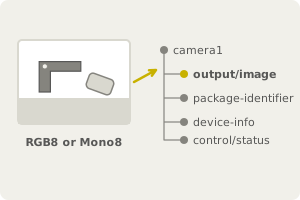
**Each image lands on the Data Layer.** Every other LumiScan app reads it from there. | Example: camera1/output/image
width
2448
height
2048
pixel-type
RGB8
is-connected
TRUE
**Capture on command.** Exposure, pixel format and trigger set per camera. |
LumiScan Cam Driver connects Ethernet cameras that follow the GenICam standard and makes their images and camera functions available on the Data Layer. It finds and connects the cameras, captures images and sets exposure time, pixel format and other GenICam features. All other LumiScan apps take their images from it, on ctrlX OS or on a PC with Windows 11 or Ubuntu 24.04.
For licensing, see [Licence](https://docs.hdvisionsystems.com/en/lumiscan-cam-driver/2.2.1/lumiscan-camdriver/requirements.html#licence). Questions or an error message? See the [FAQ](https://docs.hdvisionsystems.com/en/lumiscan-cam-driver/2.2.1/faq.html).