---
title: "LumiScan Keryx"
description: "LumiScan Keryx connects all LumiScan vision apps through one tree of named nodes, reachable from your PLC over OPC UA. Same addresses on PC and ctrlX OS."
product: "LumiScan Keryx"
component: "lumiscan-keryx"
version: "1.0.0"
display_version: "1.0.0.7"
latest_version: true
language: "en"
url: "https://docs.hdvisionsystems.com/en/lumiscan-keryx/1.0.0/index.html"
---
# LumiScan Keryx
| | | |
| --- | --- | --- |
| 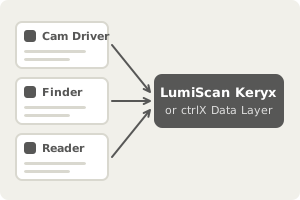
**Every app publishes its nodes.** Values, functions and results go into one tree. | 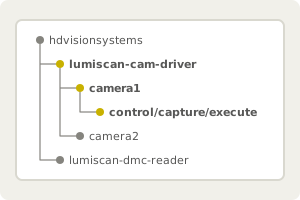
**One address for everything.** The same addresses on ctrlX OS and on a PC. | 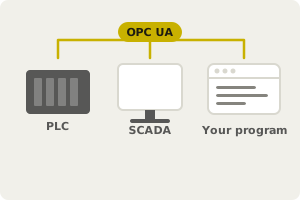
**Your PLC calls it directly.** Over OPC UA, from SCADA or from your own program. |
LumiScan Keryx is the data backbone of the LumiScan apps. Every app puts its values, functions and results into one tree of named, typed nodes, and PLCs, SCADA systems, test scripts and your own programs reach all of them at one address, with no point-to-point wiring. On a PC with Windows 11 or Ubuntu 24.04 Keryx provides the Data Layer; on ctrlX OS the apps use the ctrlX Data Layer with the same addresses and call patterns.
The LumiScan vision apps - Cam Driver, AI Object Matching, Calibration, the finders and the code readers - offer their functions as **nodes of a Data Layer**. A PLC, an OPC UA client or your own program reads, writes and calls these nodes, and the apps use the same nodes to pass images and results to each other. LumiScan Cockpit reads them to show images and results.
This manual describes what is the same in every app: how addresses are built, the three ways to call a function, streams, status codes, settings and the tools. Each product manual describes only its own nodes, in its **Data Layer Reference**, and links here for the rest.
## One interface, two Data Layers
| The app runs on | Data Layer | Read |
| --- | --- | --- |
| ctrlX OS (ctrlX CORE or a ctrlX IPC) | ctrlX Data Layer | [ctrlX Data Layer on ctrlX OS](https://docs.hdvisionsystems.com/en/lumiscan-keryx/1.0.0/ctrlx-data-layer.html) |
| a PC with Windows 11 or Ubuntu 24.04 | LumiScan Keryx | [LumiScan Keryx on a PC](https://docs.hdvisionsystems.com/en/lumiscan-keryx/1.0.0/keryx.html) |
**The node addresses, the node types and the call patterns are the same on both.** A program written against one works against the other; only the connection, the tools and the names of a few results differ. See [ctrlX Data Layer and LumiScan Keryx](https://docs.hdvisionsystems.com/en/lumiscan-keryx/1.0.0/platforms.html).
> [!NOTE]
> This manual describes the Data Layer interface of the upcoming releases of the vision apps. Several nodes have moved compared with earlier releases, without an alias at the old address. If a program written for an earlier release reads a node that is "not found", compare it with the **Data Layer Reference** of the app version you run.
## Start here
New to Keryx? Start with [What Is LumiScan Keryx?](https://docs.hdvisionsystems.com/en/lumiscan-keryx/1.0.0/what-is-keryx.html) and try it hands-on in [Getting Started with LumiScan Keryx](https://docs.hdvisionsystems.com/en/lumiscan-keryx/1.0.0/getting-started.html). Then:
1. Read [Addresses and Modules](https://docs.hdvisionsystems.com/en/lumiscan-keryx/1.0.0/addresses.html) to understand where an app’s nodes are.
2. Choose how to call a function: [Choosing a Pattern](https://docs.hdvisionsystems.com/en/lumiscan-keryx/1.0.0/calling-functions.html).
3. Look up the nodes of your app in its manual’s **Data Layer Reference**.
4. On a PC, set up the broker as in [LumiScan Keryx on a PC](https://docs.hdvisionsystems.com/en/lumiscan-keryx/1.0.0/keryx.html). To connect a PLC or SCADA system there, use the [OPC UA Connector](https://docs.hdvisionsystems.com/en/lumiscan-keryx/1.0.0/opc-ua.html).
5. On ctrlX OS, read [ctrlX Data Layer on ctrlX OS](https://docs.hdvisionsystems.com/en/lumiscan-keryx/1.0.0/ctrlx-data-layer.html): there is nothing to set up, and a ctrlX PLC on the same device uses the nodes directly.
Quick answers: [Data Layer FAQ](https://docs.hdvisionsystems.com/en/lumiscan-keryx/1.0.0/faq.html). Something does not work: [Troubleshooting](https://docs.hdvisionsystems.com/en/lumiscan-keryx/1.0.0/troubleshooting.html).
## The apps on the Data Layer
| App | Base address |
| --- | --- |
| [LumiScan Cam Driver](https://docs.hdvisionsystems.com/en/lumiscan-cam-driver/latest/index.html) | `hdvisionsystems/lumiscan-cam-driver` |
| [LumiScan AI Object Matching](https://docs.hdvisionsystems.com/en/lumiscan-ai-object-matching/latest/index.html) | `hdvisionsystems/lumiscan-ai-object-matching` |
| [LumiScan Calibration](https://docs.hdvisionsystems.com/en/lumiscan-calibration/latest/index.html) | `hdvisionsystems/lumiscan-calibration` |
| [LumiScan Template Finder](https://docs.hdvisionsystems.com/en/lumiscan-template-finder/latest/index.html) | `hdvisionsystems/lumiscan-template-finder` |
| [LumiScan Object Finder](https://docs.hdvisionsystems.com/en/lumiscan-object-finder/latest/index.html) | `hdvisionsystems/lumiscan-object-finder` |
| [LumiScan Area Detector](https://docs.hdvisionsystems.com/en/lumiscan-area-detector/latest/index.html) | `hdvisionsystems/lumiscan-area-detector` |
| [LumiScan Text Reader](https://docs.hdvisionsystems.com/en/lumiscan-text-reader/latest/index.html) | `hdvisionsystems/lumiscan-text-reader` |
| [LumiScan DMC Reader](https://docs.hdvisionsystems.com/en/lumiscan-dmc-reader/latest/index.html) | `hdvisionsystems/lumiscan-dmc-reader` |
| [LumiScan QR Code Reader](https://docs.hdvisionsystems.com/en/lumiscan-qr-code-reader/latest/index.html) | `hdvisionsystems/lumiscan-qr-code-reader` |
| [LumiScan Aztec Code Reader](https://docs.hdvisionsystems.com/en/lumiscan-aztec-code-reader/latest/index.html) | `hdvisionsystems/lumiscan-aztec-code-reader` |
| [LumiScan Barcode Reader](https://docs.hdvisionsystems.com/en/lumiscan-barcode-reader/latest/index.html) | `hdvisionsystems/lumiscan-barcode-reader` |
| [LumiScan Cockpit](https://docs.hdvisionsystems.com/en/lumiscan-cockpit/latest/index.html) | none: Cockpit only reads the other apps' nodes |
Licensing is described in the [LumiScan Licensing](https://docs.hdvisionsystems.com/en/lumiscan-licensing/1.0.4/index.html) manual.