---
title: "LumiScan Object Finder"
description: "LumiScan Object Finder finds known parts by their shape and reports position, size, score and object name to your PLC. Robust to light and surface finish."
product: "LumiScan Object Finder"
component: "lumiscan-object-finder"
version: "1.1.0"
display_version: "1.1.0.7"
latest_version: true
language: "en"
url: "https://docs.hdvisionsystems.com/en/lumiscan-object-finder/1.1.0/index.html"
---
# LumiScan Object Finder
| | | |
| --- | --- | --- |
| 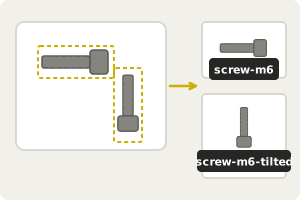
**Teach the object.** From the camera image, one object per orientation. | 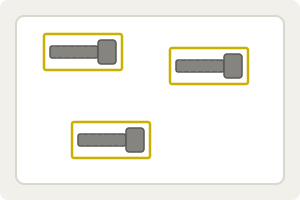
**Find it by its shape.** Matching the outline makes it robust to light and surface finish. | Example result
Matches
3
Position
820, 400 px
Score
0.93
Object
screw-m6
**Hand the result to your PLC.** Position, size, score and object name of each match. |
LumiScan Object Finder finds known objects in a camera image by their shape, the edges of their outline, which makes it tolerant of changing light and surface finish. You teach an object from the camera image; the app then reports every match with its position, size, score and object name. Use it for presence and count checks, robot picks, sorting mixed parts on a belt and orientation checks, on ctrlX OS or a Windows or Ubuntu PC.
LumiScan Object Finder runs on ctrlX OS (ctrlX CORE or ctrlX IPC) with the ctrlX Data Layer, and on a PC (Windows 11 or Ubuntu 24.04) with LumiScan Keryx. This manual covers both; where they differ, it says so.
For licensing, see [Licence](https://docs.hdvisionsystems.com/en/lumiscan-object-finder/1.1.0/lumiscan-object-finder/requirements.html#licence). Questions? See the [FAQ](https://docs.hdvisionsystems.com/en/lumiscan-object-finder/1.1.0/faq.html). A problem or an error message? See [Troubleshooting](https://docs.hdvisionsystems.com/en/lumiscan-object-finder/1.1.0/troubleshooting.html).