---
title: "LumiScan Script Runner"
description: "LumiScan Script Runner runs your MVTec HALCON procedures on the Data Layer: every parameter becomes a typed node, every call a PLC-ready handshake."
product: "LumiScan Script Runner"
component: "lumiscan-script-runner"
version: "1.0.0"
display_version: "1.0.0.2"
latest_version: true
language: "en"
url: "https://docs.hdvisionsystems.com/en/lumiscan-script-runner/index.html"
---
# LumiScan Script Runner
| | | |
| --- | --- | --- |
| 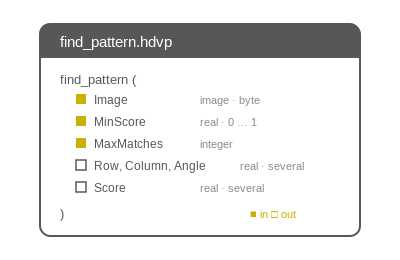
**Write it in HDevelop.** Develop and test your vision logic as a HALCON procedure, as you always do. | 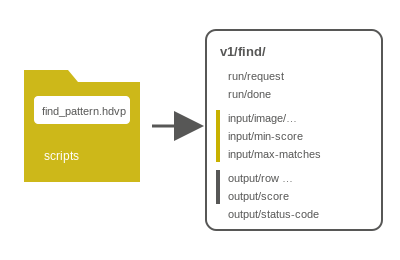
**Drop it in.** The Script Runner reads the procedure’s interface and gives every parameter its own node. | 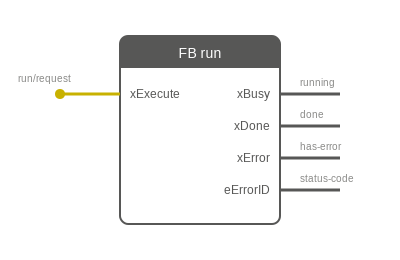
**Call it from the PLC.** One handshake per module, the same function block for every script. |
LumiScan Script Runner is the LumiScan app for vision experts who know and love HALCON. It runs your HALCON procedures (`.hdvp`) with MVTec’s HDevEngine and publishes each one as a module on the Data Layer. The procedure’s declared interface decides the nodes: one typed node per value parameter, an image group per image parameter, and a `run` handshake that a PLC function block maps one to one. Change the vision logic by replacing the procedure file, without a new software build. Procedures that share a model run in one group and pass HALCON handles through the group’s store, inside the app. The Script Runner uses the MVTec HALCON 22.11 installation on the PC, which you install with its runtime licence before the Script Runner.
To get started, see [Run Your First Script](https://docs.hdvisionsystems.com/en/lumiscan-script-runner/how-tos/run-your-first-script.html). Installing: [Requirements](https://docs.hdvisionsystems.com/en/lumiscan-script-runner/requirements.html) and [Installing the Script Runner](https://docs.hdvisionsystems.com/en/lumiscan-script-runner/installation.html). Questions or an error code? See [Status Codes](https://docs.hdvisionsystems.com/en/lumiscan-script-runner/status-codes.html) and [Troubleshooting](https://docs.hdvisionsystems.com/en/lumiscan-script-runner/troubleshooting.html). Product information and quotes: [LumiScan Script Runner on hdvisionsystems.com](https://www.hdvisionsystems.com/en/lumiscan-ecosystem/script-runner/).