---
title: "LumiScan Text Reader"
description: "LumiScan Text Reader reads part numbers, batch and date codes from camera images (OCR) and reports text and a confidence per word to your PLC."
product: "LumiScan Text Reader"
component: "lumiscan-text-reader"
version: "1.1.0"
display_version: "1.1.0.6"
latest_version: true
language: "en"
url: "https://docs.hdvisionsystems.com/en/lumiscan-text-reader/1.1.0/index.html"
---
# LumiScan Text Reader
| | | |
| --- | --- | --- |
| 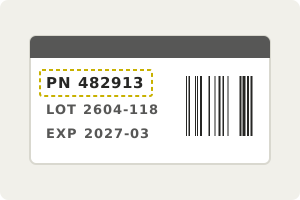
**Say where the text is.** A crop around the marking, and which characters may occur. | 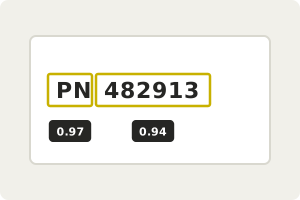
**Read it word by word.** With a confidence for every word. | Example result
Text
PN 482913
Words
2
Mean score
0.95
Status
1
**Check it in your PLC.** Compare the text and the score before you rely on it. |
LumiScan Text Reader reads printed text such as part numbers, batch and date codes and labels from a camera image. You tell it where the text is and which characters it may contain, and it returns the text with a confidence for every word, so your PLC can check the read before relying on it. It runs on ctrlX OS or a Windows or Ubuntu PC, with settings for dot-matrix and laser-etched markings.
For licensing, see [Licence](https://docs.hdvisionsystems.com/en/lumiscan-text-reader/1.1.0/lumiscan-text-reader/requirements.html#licence). Questions? See the [FAQ](https://docs.hdvisionsystems.com/en/lumiscan-text-reader/1.1.0/faq.html). A problem or an error message? See [Troubleshooting](https://docs.hdvisionsystems.com/en/lumiscan-text-reader/1.1.0/troubleshooting.html).