---
title: "JSON Settings"
product: "LumiScan VGR"
component: "lumiscan-vgr"
version: "1.8.4"
display_version: "1.8.4.6"
latest_version: true
language: "en"
url: "https://docs.hdvisionsystems.com/en/lumiscan-vgr/1.8.4/json-settings.html"
---
# JSON Settings – LumiScan VGR
The JSON settings provide the central configuration interface for LumiScan VGR. They contain information about cameras, recordings, neural networks, robots, objects, pipelines, and other application settings (Fig. 2).
The required parameters depend on the application and project configuration.
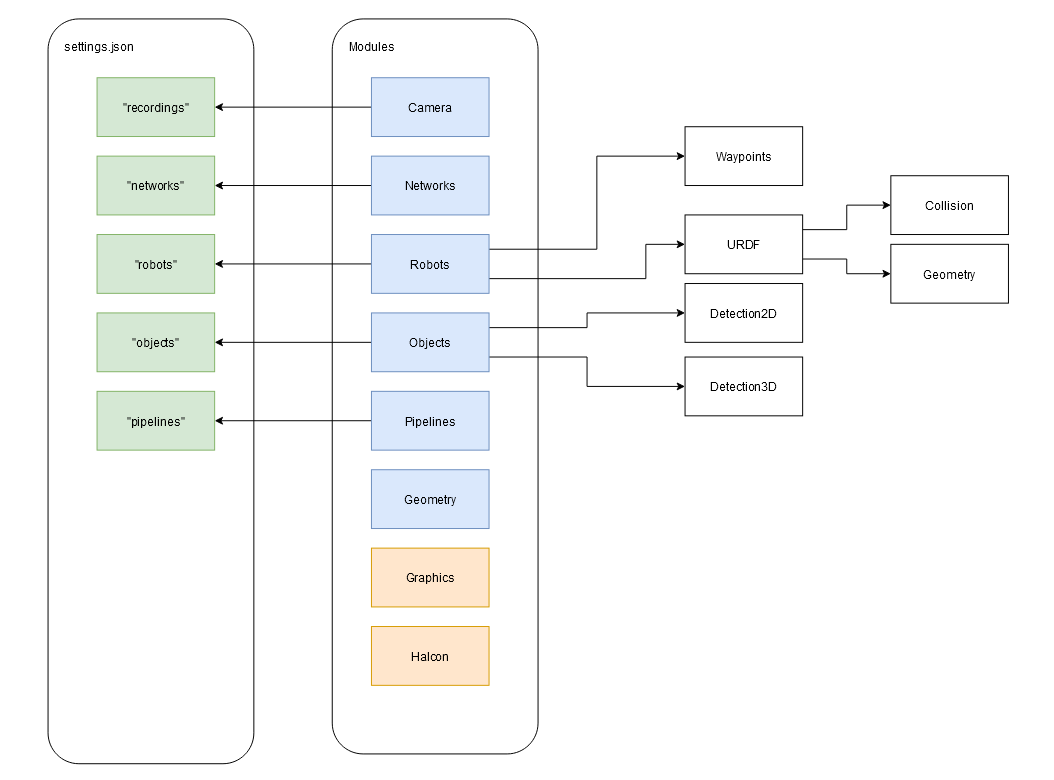
A project folder is created for each application. It contains all files and folders required for the project.
The main sections of the JSON settings are described in Table 1. Click a parameter name to open the detailed configuration reference for that section.
**Table 1. Table 1: LumiScan VGR Default JSON Settings**
| Parameter | Description |
| --- | --- |
| [`meta`](https://docs.hdvisionsystems.com/en/lumiscan-vgr/1.8.4/json-settings/meta.html) | Contains metadata about the settings file, including the settings format, target machine, application name, and software version. |
| [`cameras`](https://docs.hdvisionsystems.com/en/lumiscan-vgr/1.8.4/json-settings/cameras.html) | Contains the physical cameras used by the application. Usually, only one camera is required, but multiple cameras can be configured.
Each entry contains the camera `id`, corresponding to the serial number of the LumiScan camera, and the `calibrationFile`. |
| [`recordings`](https://docs.hdvisionsystems.com/en/lumiscan-vgr/1.8.4/json-settings/recordings.html) | Defines how image and point cloud data are acquired from a LumiScan camera. Settings include filters, depth range, and exposure parameters.
Multiple recording configurations can be created to support different scenes or objects. |
| [`networks`](https://docs.hdvisionsystems.com/en/lumiscan-vgr/1.8.4/json-settings/networks.html) | Contains the neural networks used by the application and defines how they are loaded into LumiScan VGR.
Different objects or detection tasks may require different networks or network architectures. |
| [`robots`](https://docs.hdvisionsystems.com/en/lumiscan-vgr/1.8.4/json-settings/robots.html) | Contains information about the robot geometry and its position relative to the cameras.
A physical robot can be represented by multiple robot configurations, for example to describe different grippers.
Each configuration requires a valid hand-eye calibration transformation and references a robot description file in `.urdf` format.
Additional 3D geometry can be provided for collision detection. Robots and grippers can also be visualized using CAD models in `.stl` format.
Objects such as containers can also be represented as robots if their geometry is required for collision detection. |
| [`objects`](https://docs.hdvisionsystems.com/en/lumiscan-vgr/1.8.4/json-settings/objects.html) | Defines the objects or results that can be detected by the application.
Objects to be picked are listed individually. LumiScan VGR can use both 2D and 3D data to detect and localize objects in space.
Depending on the application, detection can be based on:
- 2D detection using neural networks
- 3D object detection
- a combination of both methods
Abstract objects can also be defined, for example composite object characteristics or classification results such as `emptyContainer`. |
| [`pipelines`](https://docs.hdvisionsystems.com/en/lumiscan-vgr/1.8.4/json-settings/pipelines.html) | Defines how image and point cloud data are processed to determine object poses.
A pipeline can contain point cloud processing steps, a region of interest (ROI), and a list of objects to be detected.
Multiple pipelines can be configured and selected by the PLC. Together with the camera and robot configuration, the active pipeline defines how a gripping operation is performed. |
| [`user`](https://docs.hdvisionsystems.com/en/lumiscan-vgr/1.8.4/json-settings/user.html) | Optional. Contains user access settings, including password protection for functions requiring elevated permissions, such as `adminPassword` and `manualModePassword`. |
| [`system`](https://docs.hdvisionsystems.com/en/lumiscan-vgr/1.8.4/json-settings/system.html) | Optional. Contains system settings used for recording and debugging, including which diagnostic data should be recorded. |
## Detailed JSON Settings
Detailed descriptions of the available properties and configuration options are provided on the following pages:
- [Meta Settings](https://docs.hdvisionsystems.com/en/lumiscan-vgr/1.8.4/json-settings/meta.html)
- [Camera Settings](https://docs.hdvisionsystems.com/en/lumiscan-vgr/1.8.4/json-settings/cameras.html)
- [Recording Settings](https://docs.hdvisionsystems.com/en/lumiscan-vgr/1.8.4/json-settings/recordings.html)
- [Network Settings](https://docs.hdvisionsystems.com/en/lumiscan-vgr/1.8.4/json-settings/networks.html)
- [Robot Settings](https://docs.hdvisionsystems.com/en/lumiscan-vgr/1.8.4/json-settings/robots.html)
- [Object Settings](https://docs.hdvisionsystems.com/en/lumiscan-vgr/1.8.4/json-settings/objects.html)
- [Pipeline Settings](https://docs.hdvisionsystems.com/en/lumiscan-vgr/1.8.4/json-settings/pipelines.html)
- [User Settings](https://docs.hdvisionsystems.com/en/lumiscan-vgr/1.8.4/json-settings/user.html)
- [System Settings](https://docs.hdvisionsystems.com/en/lumiscan-vgr/1.8.4/json-settings/system.html)