---
title: "PROFINET Interface Reference"
product: "LumiScan VGR"
component: "lumiscan-vgr"
version: "1.8.4"
display_version: "1.8.4.6"
latest_version: true
language: "en"
url: "https://docs.hdvisionsystems.com/en/lumiscan-vgr/1.8.4/profinet.html"
---
# PROFINET Interface Reference – LumiScan VGR
The PROFINET interface provides communication between LumiScan VGR and the PLC.
This chapter describes:
- the memory layout of the exchanged signals
- the PROFINET device modules
- the process flow for function calls
- the available functions
- return codes
- operation modes
For an explanation of how the interface is used during operation, see [PLC Settings](https://docs.hdvisionsystems.com/en/lumiscan-vgr/1.8.4/plc-settings.html).
## Memory Layout
The signal memory is organized into slots.
Two groups of signals are exchanged:
- **PLC inputs (`OUT_`**):\* Values written by LumiScan VGR and read by the PLC.
- **PLC outputs (`IN_`**):\* Values written by the PLC and read by LumiScan VGR.
### PLC Inputs (`OUT_*`)
| Slot / Group | Byte Address | Bit | Data Type | Name | Description |
| --- | --- | --- | --- | --- | --- |
| Slot 1 - System Signals | 0 | 0 | bool | `OUT_HeartBeat` | Mirrors the value of `IN_HeartBeat`. |
| Slot 1 - System Signals | 0 | 1 | bool | `OUT_Error` | Set to `1` when LumiScan VGR is in an error state. |
| Slot 1 - System Signals | 0 | 2 | bool | `OUT_ResetReady` | Indicates whether the reset function is ready to be executed. |
| Slot 1 - System Signals | 0 | 3 | bool | `OUT_ResetRunning` | Indicates whether the reset function is currently running. |
| Slot 1 - System Signals | 0 | 4 | bool | `OUT_SetupReady` | Indicates whether the setup function is ready to be executed. |
| Slot 1 - System Signals | 0 | 5 | bool | `OUT_SetupRunning` | Indicates whether the setup function is currently running. |
| Slot 1 - System Signals | | | | | Reserved |
| Slot 1 - Status Signals | 4 | | byte/uchar | `OUT_OperationMode` | Contains the current operation mode. It can be changed using the Set Parameter function.
`0` - `IDLE`: Only parameter-setting functions are available.
`1` - `AUTOMATIC`: All processing functions are available.
`2` - `MANUAL`: LumiScan VGR is controlled through the user interface. |
| Slot 1 - Status Signals | 5 | 0 | bool | `OUT_IsSetup` | Indicates whether system setup has been completed. |
| Slot 1 - Status Signals | | | | | Reserved |
| Slot 1 - Trigger Signals | 8 | 0 | bool | `OUT_SetParameterReady` | Indicates whether the Set Parameter function is ready. |
| Slot 1 - Trigger Signals | 8 | 1 | bool | `OUT_SetParameterRunning` | Indicates whether the Set Parameter function is running. |
| Slot 1 - Trigger Signals | 9 | 0 | bool | `OUT_TriggerCameraReady` | Indicates whether camera triggering is ready. |
| Slot 1 - Trigger Signals | 9 | 1 | bool | `OUT_TriggerCameraRunning` | Indicates whether camera triggering is running. |
| Slot 1 - Trigger Signals | 10 | 0 | bool | `OUT_ComputeObjectsReady` | Indicates whether object computation is ready. |
| Slot 1 - Trigger Signals | 10 | 1 | bool | `OUT_ComputeObjectsRunning` | Indicates whether object computation is running. |
| Slot 1 - Trigger Signals | 11 | 0 | bool | `OUT_GetBestResultReady` | Indicates whether the best-result calculation is ready. |
| Slot 1 - Trigger Signals | 11 | 1 | bool | `OUT_GetBestResultRunning` | Indicates whether the best-result calculation is running. |
| Slot 1 - Trigger Signals | 12 | 0 | bool | `OUT_GripBestResultReady` | Indicates whether the Grip Best Result function is ready. |
| Slot 1 - Trigger Signals | 12 | 1 | bool | `OUT_GripBestResultRunning` | Indicates whether the Grip Best Result function is running. |
| Slot 1 - Trigger Signals | 13 | 0 | bool | `OUT_GetParameterReady` | Indicates whether the Get Parameter function is ready. |
| Slot 1 - Trigger Signals | 13 | 1 | bool | `OUT_GetParameterRunning` | Indicates whether the Get Parameter function is running. |
| Slot 1 - Trigger Signals | 14 | 0 | bool | `OUT_ResetCameraReady` | Indicates whether the Reset Camera function is ready. |
| Slot 1 - Trigger Signals | 14 | 1 | bool | `OUT_ResetCameraRunning` | Indicates whether the Reset Camera function is running. |
| Slot 1 - Trigger Signals | … | | | `OUT_GripPriority` | Grip priority of the selected result. |
| Slot 2 - Data | 64 | | byte/uchar | `OUT_ReturnCode` | Contains the return code of the last executed function. |
| Slot 2 - Data | 65 | | byte/uchar | `OUT_ObjectId` | ID of the object as defined in the JSON settings. |
| Slot 2 - Data | 66 | | 6 x float | `OUT_BBoxGripFrame` | Not implemented. |
| Slot 2 - Data | 90 | | 6 x float | `OUT_BBoxObjectFrame` | Bounding box of the object in the object coordinate system:
`[xmin, ymin, zmin, xmax, ymax, zmax]` in meters. |
| Slot 2 - Data | 114 | | float | `OUT_PrevObjectDepth` | Depth of the previously gripped object in meters. Valid only when the value is greater than or equal to `0.0`. |
| Slot 2 - Data | 118 | | byte/uchar | `OUT_NumObjects` | Number of objects in the scene that have not yet been gripped. |
| Slot 2 - Data | … | | | | Reserved |
| Slot 3 - Data | 128 | | 7 x float | `OUT_PoseMoveInRobot` | Pose of the move frame for a grip point in robot coordinates:
`[tx, ty, tz, r1, r2, r3, r4]`
`t` represents the translational component and `r` the rotational component. Units and rotation conventions depend on the robot configuration. If the rotation convention does not use quaternions, `r4` contains no information. |
| Slot 3 - Data | 156 | | 7 x float | `OUT_PoseObjectInTcp` | Pose of the object in TCP coordinates. Uses the same pose format as `OUT_PoseMoveInRobot`. |
| Slot 3 - Data | … | | | | Reserved |
| Slot 4 - Data | 192 | | float | `OUT_ObjectScore2D` | Score of the 2D object detection result. |
| Slot 4 - Data | 196 | | float | `OUT_PrevObjectCurvature` | Curvature of the previously gripped object. |
| Slot 4 - Data | 200 | | int | `OUT_PrevObjectInnerNearestNeighbour` | Nearest-neighbor value of the previously gripped object. |
| Slot 4 - Data | 204 | | int | `OUT_DepthLimitMM` | Currently configured lower or upper depth limit. |
| Slot 4 - Data | 208 | | int | `OUT_ImageReference` | Currently configured image reference. |
| Slot 4 - Data | 212 | | float | `OUT_ObjectScore3D` | Score of the 3D object detection result. |
| Slot 4 - Data | 216 | | float | `OUT_CameraTemperature` | Current camera temperature in °C. The value is updated when an image is captured. |
| Slot 4 - Data | … | | | | Reserved |
### PLC Outputs (`IN_*`)
| Slot / Group | Byte Address | Bit | Data Type | Name | Description |
| --- | --- | --- | --- | --- | --- |
| Slot 5 - System Signals | 0 | 0 | bool | `IN_HeartBeat` | Heartbeat signal from the PLC. `OUT_HeartBeat` follows this value. |
| Slot 5 - System Signals | 0 | 1 | bool | `IN_Error` | Reserved for PLC errors. |
| Slot 5 - System Signals | 0 | 2 | bool | `IN_ResetRequest` | Requests execution of the reset function. |
| Slot 5 - System Signals | 0 | 3 | bool | `IN_EnableAdminMode` | If `system/enableExternalAdminModeControl` is set to `true` in the JSON settings, this signal can be used to enable or disable admin mode.
The PLC should only change this value when no function is currently running. |
| Slot 5 - System Signals | 0 | 4 | bool | `IN_SetupRequest` | Requests execution of the setup function. |
| Slot 5 - System Signals | | | | | Reserved |
| Slot 5 - Status Signals | 4 | | | | Reserved |
| Slot 5 - Status Signals | … | | | | |
| Slot 5 - Trigger Signals | 8 | 0 | bool | `IN_SetParameterRequest` | Requests execution of the Set Parameter function. |
| Slot 5 - Trigger Signals | 9 | 0 | bool | `IN_TriggerCameraRequest` | Requests a new image from the active camera. |
| Slot 5 - Trigger Signals | 10 | 0 | bool | `IN_ComputeObjectsRequest` | Requests object computation. |
| Slot 5 - Trigger Signals | 11 | 0 | bool | `IN_GetBestResultRequest` | Requests calculation of the best grip result. |
| Slot 5 - Trigger Signals | 12 | 0 | bool | `IN_GripBestResultRequest` | Requests confirmation of the best grip result. |
| Slot 5 - Trigger Signals | 13 | 0 | bool | `IN_GetParameterRequest` | Requests a parameter value. |
| Slot 5 - Trigger Signals | 14 | 0 | bool | `IN_ResetCameraRequest` | Requests a reset of the specified camera. |
| Slot 5 - Trigger Signals | … | | | | Reserved |
| Slot 6 - Data | 64 | | byte/uchar | `IN_ParamId` | Specifies the parameter or operation used by the Set Parameter or Get Parameter function. |
| Slot 6 - Data | 65 | | byte/uchar | `IN_ParamArgByte` | Byte argument used by parameter functions. |
| Slot 6 - Data | 66 | | int | `IN_ParamArgInt` | Integer argument used by parameter functions. |
| Slot 6 - Data | 70 | | float | `IN_ParamArgFloat` | Float argument used by parameter functions. |
| Slot 6 - Data | 74 | | 32 x byte/uchar | `IN_ParamArgString` | String argument used by parameter functions. |
| Slot 6 - Data | … | | | | Reserved |
| Slot 7 - Data | 128 | | 7 x float | `IN_PoseMoveInRobot` | Current pose in robot coordinates using the move frame. This value should always be available. |
| Slot 7 - Data | … | | | | Reserved |
| Slot 8 - Reserved | 192 | | | | Reserved |
| Slot 8 - Reserved | … | | | | Reserved |
## Device Modules
### Inputs
| Slot | Module | Type | Length | Address |
| --- | --- | --- | --- | --- |
| 1 | 64 Bytes Input | QB | 64 | 0 |
| 2 | 64 Bytes Input | QB | 64 | 64 |
| 3 | 64 Bytes Input | QB | 64 | 128 |
| 4 | 64 Bytes Input | QB | 64 | 192 |
### Outputs
| Slot | Module | Type | Length | Address |
| --- | --- | --- | --- | --- |
| 5 | 64 Bytes Output | IB | 64 | 0 |
| 6 | 64 Bytes Output | IB | 64 | 64 |
| 7 | 64 Bytes Output | IB | 64 | 128 |
| 8 | 64 Bytes Output | IB | 64 | 192 |
## Process Flow
Each process uses three signals:
- `OUT_*Ready`
- `IN_*Request`
- `OUT_*Running`
The execution sequence is the same for all functions.
| Step | OUT | IN | Note |
| --- | --- | --- | --- |
| 1 | | Wait until `OUT_*Ready == 1` | Not applicable to reset functions |
| 2 | | Set `IN_*Request → 1` | |
| 3 | Check `IN_*Request == 1` | | |
| 4 | Set `OUT_*Ready → 0` | | |
| 5 | Set `OUT_*Running → 1` | | |
| 6 | | Wait until `OUT_*Ready == 0` | Not applicable to reset functions |
| 7 | | Check `OUT_*Running == 1` | Otherwise, the trigger is discarded |
| 8 | | Set `IN_*Request → 0` | |
| 9 | Wait until `IN_*Request == 0` | | |
| 10 | Execute the requested function | | |
| 11 | Set output variables | | |
| 12 | Set `OUT_*Running → 0` | | |
| 13 | Set `OUT_*Ready → 1` | | |
| 14 | | Wait until `OUT_*Running == 0` | |
| 15 | | Check the return code | |
| 16 | | Read the output variables | |
For a more detailed explanation of the handshake behavior, see [PLC Settings: Process Flow](https://docs.hdvisionsystems.com/en/lumiscan-vgr/1.8.4/plc-settings.html#process-flow).
## Function Descriptions
| Function | Input | Output | Description | Prerequisite |
| --- | --- | --- | --- | --- |
| `IN_Reset` | | | Resets all `OUT_*` variables to their default values. All output values are set to zero and `OUT_OperationMode` is set to `IDLE`. | |
| `OUT_Reset` | | | Resets all `IN_*` variables to their default values. | |
| `OUT_SetParameter` | `IN_ParamId`
`IN_ParamArgByte`
`IN_ParamArgInt`
`IN_ParamArgFloat`
`IN_ParamArgString` | `OUT_ReturnCode` | Sets a parameter. `IN_ParamId` specifies which parameter is changed:
`0` - `SET_OPERATION_MODE`: Sets `OUT_OperationMode` to the value of `IN_ParamArgByte`. The PLC cannot switch the system out of manual mode; manual mode must be exited through the user interface.
`1` - `SET_CAMERA_ID`: Sets the active camera to the ID specified by `IN_ParamArgString`.
`2` - `SET_PIPELINE_ID`: Sets the active pipeline to the ID specified by `IN_ParamArgString`.
`3` - `SET_ROBOT_ID`: Sets the active robot to the ID specified by `IN_ParamArgString`. | `OUT_OperationMode = AUTOMATIC` or `IDLE` |
| `OUT_GetParameter` | `IN_ParamId`
`IN_ParamArgByte`
`IN_ParamArgInt`
`IN_ParamArgFloat`
`IN_ParamArgString` | `OUT_ReturnCode` plus the output specified by the selected parameter | Reads a parameter. `IN_ParamId` specifies the requested value:
`0` - `GET_NUM_OBJECTS_2D_TOTAL`: Returns the total number of objects detected in 2D via `OUT_NumObjects`.
`1` - `GET_NUM_OBJECTS_3D_TOTAL`: Returns the number of 3D-detected objects that have not yet been gripped via `OUT_NumObjects`.
`2` - `GET_NUM_OBJECTS_2D_TYPE`: Returns the number of 2D-detected objects of the type specified in `IN_ParamArgString`.
`3` - `GET_NUM_OBJECTS_3D_TYPE`: Returns the number of 3D-detected objects of the type specified in `IN_ParamArgString` that have not yet been gripped.
`4` - `GET_DEPTH_MIN_MM`: Returns the minimum depth via `OUT_DepthLimitMM`.
`5` - `GET_DEPTH_MAX_MM`: Returns the maximum depth via `OUT_DepthLimitMM`. | `OUT_OperationMode = AUTOMATIC` |
| `OUT_TriggerCamera` | | `OUT_ReturnCode` | Captures an image with the currently active camera. | `OUT_OperationMode = AUTOMATIC` |
| `OUT_ComputeObjects` | | `OUT_ReturnCode` | Calculates the poses of all detected objects from the most recent image using the active pipeline. | `OUT_OperationMode = AUTOMATIC` |
| `OUT_GetBestResult` | `IN_ParamArgByte`
`IN_ParamArgFloat` | `OUT_ReturnCode`
`OUT_ObjectId`
`OUT_ObjectScore2D`
`OUT_ObjectScore3D`
`OUT_BBoxGripFrame`
`OUT_BBoxObjectFrame`
`OUT_PrevObjectDepth`
`OUT_PrevObjectCurvature`
`OUT_PrevObjectInnerNearestNeighbour`
`OUT_NumObjects`
`OUT_PoseMoveInRobot`
`OUT_PoseObjectInTcp`
`OUT_GripPriority` | Calculates grip points for the active robot using the most recently calculated object poses and returns information about the highest-priority valid grip.
If path planning is configured, the input arguments can be used to evaluate the trajectory at a specific point:
\* `IN_ParamArgByte`: ID of the path segment (`0` to `n - 1`) \* `IN_ParamArgFloat`: Interpolation factor from `0.0` to `1.0`
`0.0` represents the start of the path segment and `1.0` the end.
Path segment `0` always exists, even if no path planning is configured. In that case, it returns a constant result for all interpolation factors.
If invalid arguments are supplied, they are set to `0` before execution. No error is returned for this case.
`OUT_GripPriority` indicates the grip priority assigned to the selected grip point. The priority is configured for each grip point of an object. | `OUT_OperationMode = AUTOMATIC` |
| `OUT_GripBestResult` | `IN_ParamArgByte`
`IN_ParamArgFloat` | | Performs the same calculation as `OUT_GetBestResult` and additionally informs the system that the selected result has been or will be gripped. | `OUT_OperationMode = AUTOMATIC` |
| `OUT_ResetCamera` | `IN_ParamArgString` | | Resets the camera specified by its ID in `IN_ParamArgString`. After resetting the camera, Setup must be executed again. | `OUT_OperationMode = AUTOMATIC` |
## Return Codes
The return codes are described in [PLC Settings: Status Information](https://docs.hdvisionsystems.com/en/lumiscan-vgr/1.8.4/plc-settings.html#status-information).
## Application Example
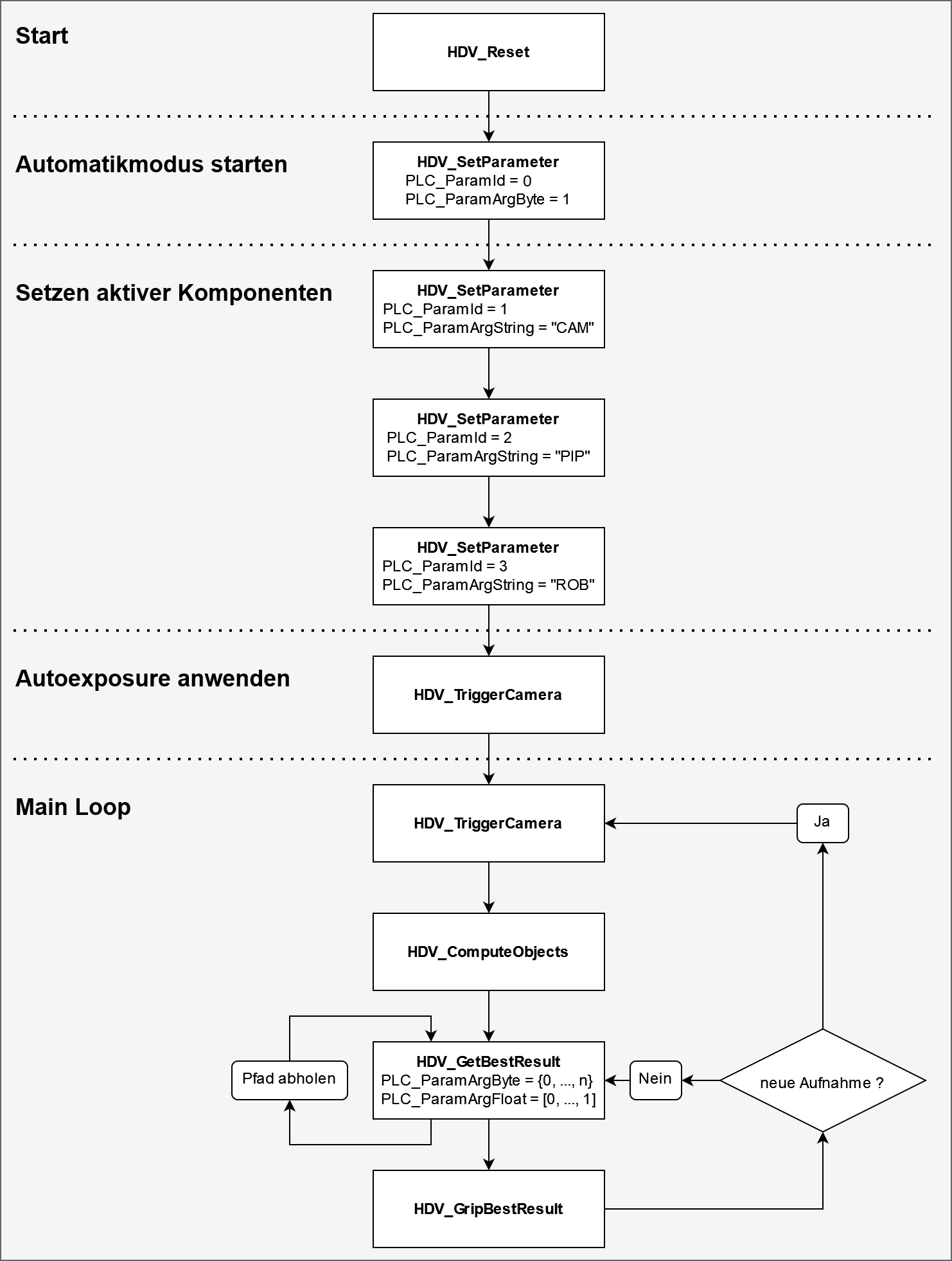
The following diagram shows an example process using one camera, one pipeline, and one robot.
The example assumes that the operation mode does not change during the process. After each function call, check the return code and handle any reported error before continuing.
If auto-exposure is enabled in the configuration, it is applied after each image capture. When the scene changes, an initial image can therefore be captured to adjust the exposure before the picking process begins.
Multiple objects can be picked from a single captured image. Depending on the required cycle time, it may also be practical to capture a new image before each grip.
### Manual Mode
During operation, manual mode can be activated through the user interface. The operation mode then changes to `MANUAL` (`2`).
While manual mode is active, processing functions cannot be started from the PLC.
When manual mode is exited, the system changes to `IDLE` (`0`). To resume automatic processing, set the operation mode back to `AUTOMATIC` through the PLC.
See also [Manual Mode](https://docs.hdvisionsystems.com/en/lumiscan-vgr/1.8.4/manual-mode.html).
### Multiple Components
All calculations use the currently active camera, pipeline, and robot.
If a project contains multiple cameras, pipelines, or robots, make sure that the correct active components are selected using `OUT_SetParameter` before executing each function.
## Reference Lists
### Operation Modes
| ID | Mode | Description |
| --- | --- | --- |
| 0 | `IDLE` | The system is idle. Processing functions are not available. |
| 1 | `AUTOMATIC` | Automatic PLC-controlled operation. Processing functions are available. |
| 2 | `MANUAL` | Manual operation through the user interface. |
| 3 | `SHUTDOWN` | The application shuts down. |