Finding and Sorting Images
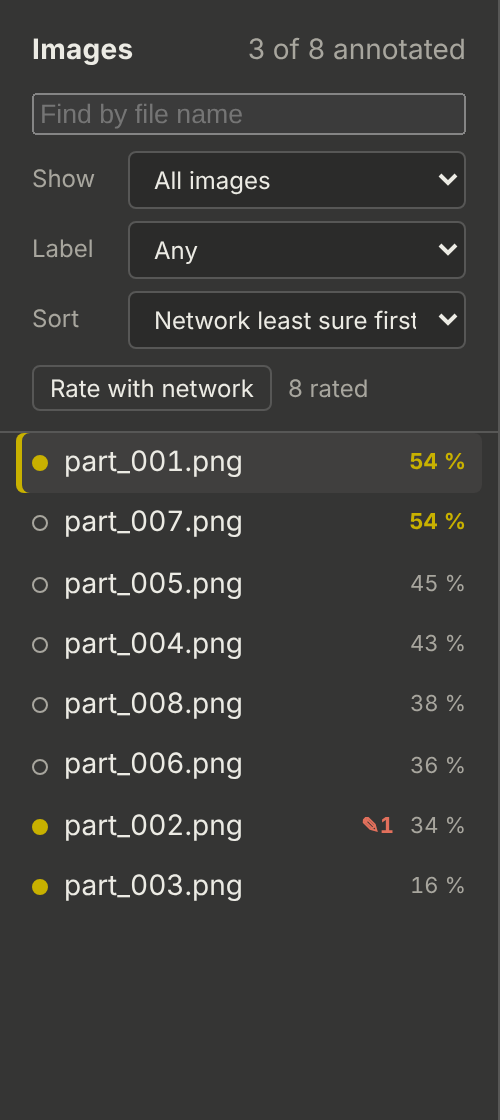
Above the image list are the controls that decide which images the list shows and in which order.
Search
Type part of a file name, for example 14-13 or part_03. The list shows only the matching images. Enter opens the first match, Esc clears the search.
Show
All images |
Every image of the folder. |
Without boxes |
Images that still need annotating. With several annotators per image: Not annotated by me (annotating) or Need a review (reviewing). |
With boxes |
Images with an annotation. With several annotators: Annotated by me or Finished. |
With notes for me |
Images with an open revision note addressed to you. |
Network unsure |
Images the project’s network is unsure about (50 % or more), after rating. |
The image you have open always stays in the list. Previous and Next (A / D) skip the images the list does not show.
Label
Only images with at least one box of that label, or No boxes. Useful to check all boxes of a rare class, or to find images where a class is missing. The labels come from the saved annotations, so unsaved changes do not count yet.
| With several annotators per image, annotators work without seeing the reference annotation, so the label filter is only offered to reviewers there. |
Sort
File name |
The order of the folder. |
Largest differences first |
Reviewing with several annotators: images to check first, the most differences on top. |
Network least sure first |
After rating: the images the network is least sure about on top, with the percentage next to each name. |
Rate with network (active learning)
Not every image is equally useful for training. Images the network already handles well add little; the ones it is unsure about teach it the most. Rate with network lets the project’s trained network look at every image of the folder and say how sure it is.
-
Choose the folder.
-
Click Rate with network. By default only images without boxes are rated; tick Also images with boxes to rate all, and Rate again after a new network was trained.
-
The rating runs on the server; you can keep working. The progress is shown next to the button.
-
The list switches to Network least sure first. Annotate from the top.
The button is shown when the server has box suggestions. The network is the one chosen in the project settings.
How the percentage is computed: the network looks for objects down to a very low confidence. A detection exactly at the project’s minimum confidence (default 30 %) counts as 100 % unsure: the network cannot decide whether something is there. A detection near 0 % or 100 % counts as sure. The image gets the value of its most uncertain detection. An image without any detection gets 0 %.
| Rate, annotate the 50 to 100 least sure images, train, rate again with the new network. This finds the difficult cases much faster than annotating in file order. |