How To: Read a Data Matrix Code from a Camera Image
This guide reads the Data Matrix codes in an image of LumiScan Cam Driver with LumiScan DMC Reader and shows where to find the decoded text and position.
When you have finished, one write to the reader’s execute method reads every Data Matrix code in the
current camera image.
The same steps apply to LumiScan QR Code Reader, LumiScan Aztec Code Reader and LumiScan Barcode Reader:
replace lumiscan-dmc-reader in the addresses with the name of that application.
Before you start
-
LumiScan DMC Reader and LumiScan Cam Driver run on the same device - the same ctrlX CORE or ctrlX IPC, or the same PC. Reading an image from another device is not supported.
-
The camera module of LumiScan Cam Driver is connected and can capture images.
-
Optional: LumiScan Cockpit, to see the codes on the image.
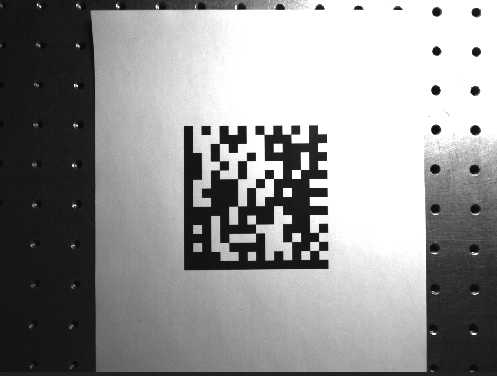
| Without a camera, use a simulated camera of LumiScan Cam Driver with example images, for example the image below. See LumiScan Cam Driver: How does simulation mode work?. |
How it fits together
LumiScan DMC Reader needs no template and no configuration. It reads the image node whose address you
give it, searches the whole image for ECC 200 Data Matrix codes, and writes every code it finds to
output/results.
All addresses below are relative to hdvisionsystems/lumiscan-dmc-reader. On ctrlX OS, values can be set
in the ctrlX web interface under Settings > Data Layer, or by another application, for example a PLC
program.
Step 1 - Point the reader at the camera image
Write the address of the camera’s image node to input/image-address. For the camera module camera1:
hdvisionsystems/lumiscan-cam-driver/camera1/output/image
Use the address of the image node itself, not of its data child. The address is kept, so you set it
again only when the image source changes.
Step 2 - Capture an image
Capture an image with LumiScan Cam Driver, for example with a write to
hdvisionsystems/lumiscan-cam-driver/camera1/control/capture/execute.
For a reliable read, the code should be sharp, have good contrast, and its modules - the black and white squares - should be several pixels wide in the image.
Step 3 - Read the codes
Write an empty value to execute.
The call returns when the search has finished.
Step 4 - Check the result
Read output/results. It holds one entry per code found:
-
text- the decoded content, -
center- the centre of the code in the image, in pixels, -
score- how confident the read is, -
polygons- the corner points of the code, if given.
An empty list means that the image was read and contained no Data Matrix code. The fields are described in The Result.
|
A failed run - for example when the image address is wrong or the image cannot be read - leaves
|
To see the codes on the image, open LumiScan Cockpit and select the view datamatrix-code of
lumiscan-dmc-reader. Each code is framed and labelled with its text and score.
Result
-
LumiScan DMC Reader reads the current image of the camera.
-
One write to
executereads every Data Matrix code in the image. -
The decoded text and the position of each code are on
output/results.
In production, a cycle is: capture with LumiScan Cam Driver, write to execute of the reader, read
output/results. To have every frame of a camera stream read without a call per image, see
Reading Codes on an Image Stream (Experimental).
Problems are described in Troubleshooting.