Which Licensing Path Applies
Two things decide how your LumiScan software is licensed: where you bought it, and where it runs.
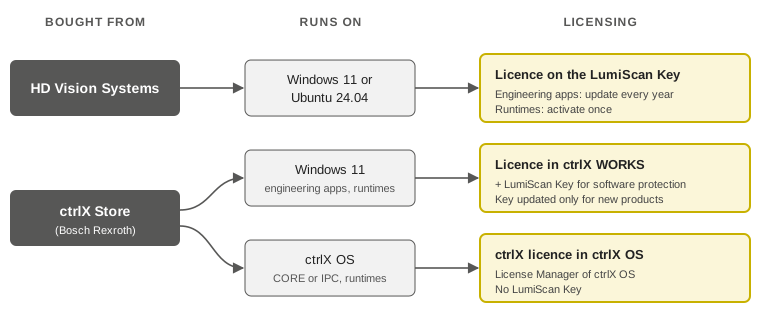
| Bought from | Runs on | Where the licence is held | Role of the LumiScan Key |
|---|---|---|---|
HD Vision Systems |
Windows 11 or Ubuntu 24.04 |
On the LumiScan Key |
Carries the licence. Engineering apps need a licence update every year. |
ctrlX Store (Bosch Rexroth) |
Windows 11 |
In ctrlX WORKS |
Required in addition. It protects the software against reverse engineering; it does not carry the licence. It is updated only when you add a new LumiScan product. |
ctrlX Store (Bosch Rexroth) |
ctrlX OS on a ctrlX CORE or an IPC (runtimes running natively on ctrlX OS) |
In the License Manager of ctrlX OS |
Not used. |
Continue with the page for your path:
| If you use several LumiScan products, each one can follow a different path. For example, LumiScan Annotation Framework bought in the ctrlX Store is licensed in ctrlX WORKS on your Windows PC, while LumiScan AI Object Matching running on a ctrlX CORE has a ctrlX licence there. |