The LumiScan Key
The LumiScan Key is the USB licence key for LumiScan software. It is a CodeMeter container by WIBU-SYSTEMS AG. In all LumiScan documentation and communication it is called LumiScan Key.
Recognising the key
CodeMeter Control Center lists every licence container available on the PC on its License tab. The LumiScan Key appears as CmStick/C with a serial number of the form 3-1234567. The serial number is also printed on the key.
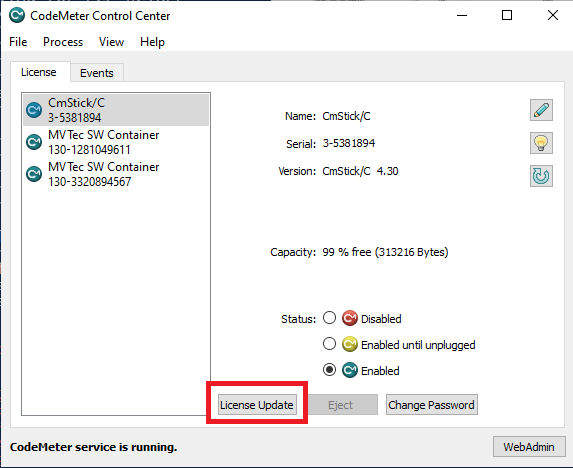
Other entries, for example MVTec SW Container, belong to software from other vendors and are not relevant for LumiScan licensing.
On a PC without a graphical interface, cmu --list shows the same information (see Checking the installation).
What the key does
Depending on your licensing path, the LumiScan Key has one of two roles:
- Licence carrier
-
For software bought from HD Vision Systems, the licences are stored on the key. A PC can run the licensed products only while the key is available.
- Software protection
-
For apps bought in the ctrlX Store and running on Windows 11, the licence is held in ctrlX WORKS. The key is still required, because it protects the software against reverse engineering. It does not hold a second licence, and you do not pay twice.
See Which Licensing Path Applies for which role applies to you.
One key for several products
A single LumiScan Key can carry licences for several LumiScan products. When you buy an additional product, HD Vision Systems adds it to your existing key with a licence update (see Requesting a Licence Update). You do not need a second key.
Using the key on several PCs
Licences on the LumiScan Key are not bound to a PC. You can move the key to another PC and use the software there (see Moving the Key to Another PC).
A product can run on as many PCs at the same time as your keys hold licences for it. If all licences are in use, the application reports User maximum reached! (see Troubleshooting).
Handling the key
-
Keep the key in a safe place. The licences are stored on it, so a lost key means lost licences.
-
Do not remove the key while a LumiScan application is running or while a licence update is being written.
-
If the key stays plugged in at a machine, secure it against being pulled out by accident, for example with a short USB extension fixed inside the control cabinet.