Creating New Camera Settings Files
You create a new file with camera settings by copying an existing one under a new name, and then
specify the new file name in the application settings (lumiscan-cam-driver.json). How to do this
depends on the platform.
On ctrlX OS
You can create a new file with camera settings simply by duplicating an existing file. To do this:
-
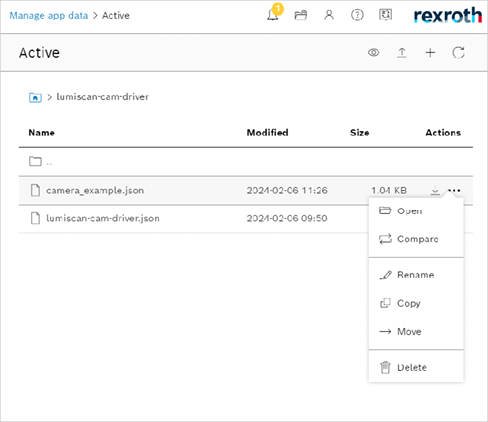
Click the triple dots you see to the right of the file name.
-
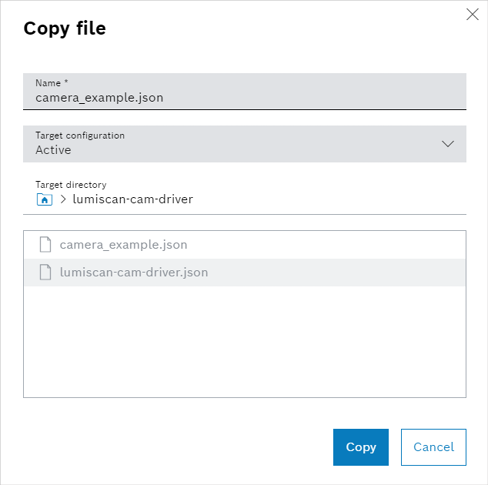
Select COPY
-
The copy file window appears.
-
Set new file name.
-
Confirm with clicking on Copy.
-
New camera settings file is created.
-
Now you can specify the newly created file name in the application settings (lumiscan-cam-driver.json):
-
Save the changes.
-
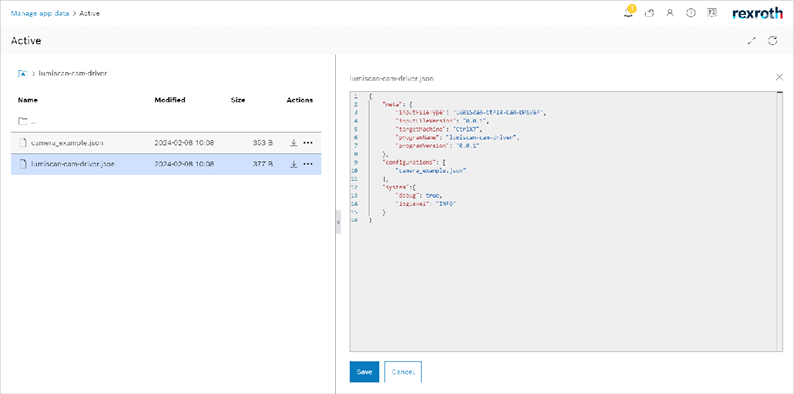
Left-click on the lumiscan-cam-driver.json file name.
-
The JSON settings window will open on the right.
-
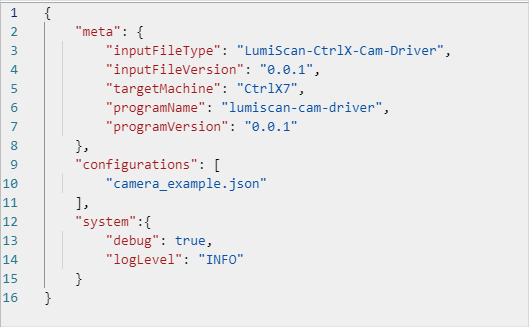
Enter the name in the
configurationfield.
-
On a PC
You can create a new file with camera settings by copying an existing one in the settings folder under a new
name. Then specify the new file name in the configuration field of the application settings
(lumiscan-cam-driver.json) and restart the Cam Driver.
Starting from an Example
The Cam Driver writes an example of its settings files, together with their schemas, into a folder of your choice, and ends without starting. For example (Windows):
lumiscan-cam-driver --generate-settings C:\work\cam-driver-settingsWithout a folder (-g alone) it writes into the current folder. The example is the application
settings file lumiscan-cam-driver.json with one simulated camera, its module file
lumiscan-cam-driver-example-module.json, and the four schemas in schemas\ that an editor uses to
check them. Existing files are never overwritten: when one of them is in the folder already, nothing
is written and the Cam Driver says which.
The Cam Driver then names the folder it reads its settings from. On Windows this is by default
C:\ProgramData\HD Vision Systems GmbH\LumiScan Vision Suite\lumiscan-cam-driver\etc\lumiscan-cam-driver.
Edit the example, copy it there, and start the Cam Driver.
A module can also be added on the Data Layer, on ctrlX OS and on a PC: see Adding and removing modules.