Project Settings
Project admins open the settings of the current project with Settings in the top bar. They apply to everyone in the project and are stored in the project folder (.lumiscan-annotation/settings.json, the keys labels and roiSettings as in the desktop tool).
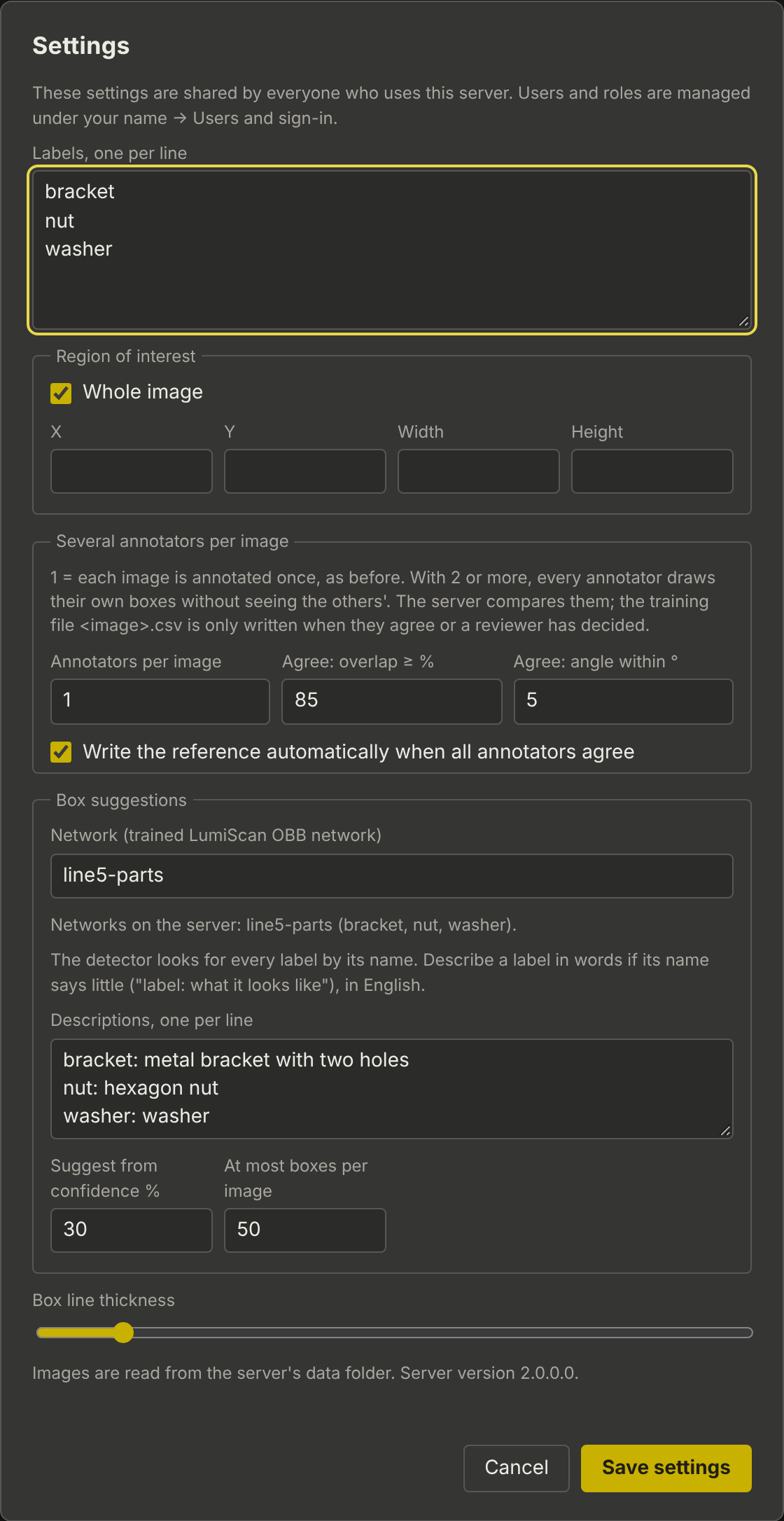
Labels
One label per line. The order gives the keys 1 to 9 and the order in the list. Renaming a label here does not change boxes already saved with the old name.
Region of interest
Whole image, or a rectangle in image pixels (X, Y, Width, Height). The rectangle is outlined on every image; box suggestions outside it are left out.
Several annotators per image
Annotators per image |
|
Agree: overlap ≥ % |
Minimum overlap of matching boxes (rotated intersection over union), default 85. |
Agree: angle within ° |
Maximum angle difference, default 5. |
Write the reference automatically when all annotators agree |
On (default): the server writes the mean boxes as the reference. Off: every image goes to review. |
Box suggestions
Shown when the server has a box suggestion service.
Network |
The trained network of the project, from the networks on the service (the list shows their classes). Empty with only one network: that one. |
Descriptions |
For the open-vocabulary detector: describe in English what a label looks like if its name says little, one per line, for example |
Suggest from confidence % |
Suggestions below are left out, default 30. |
At most boxes per image |
Default 50. |