Working at the Same Time
Any number of people can work in the same project at the same time. Two rules keep their work apart.
Edit locks
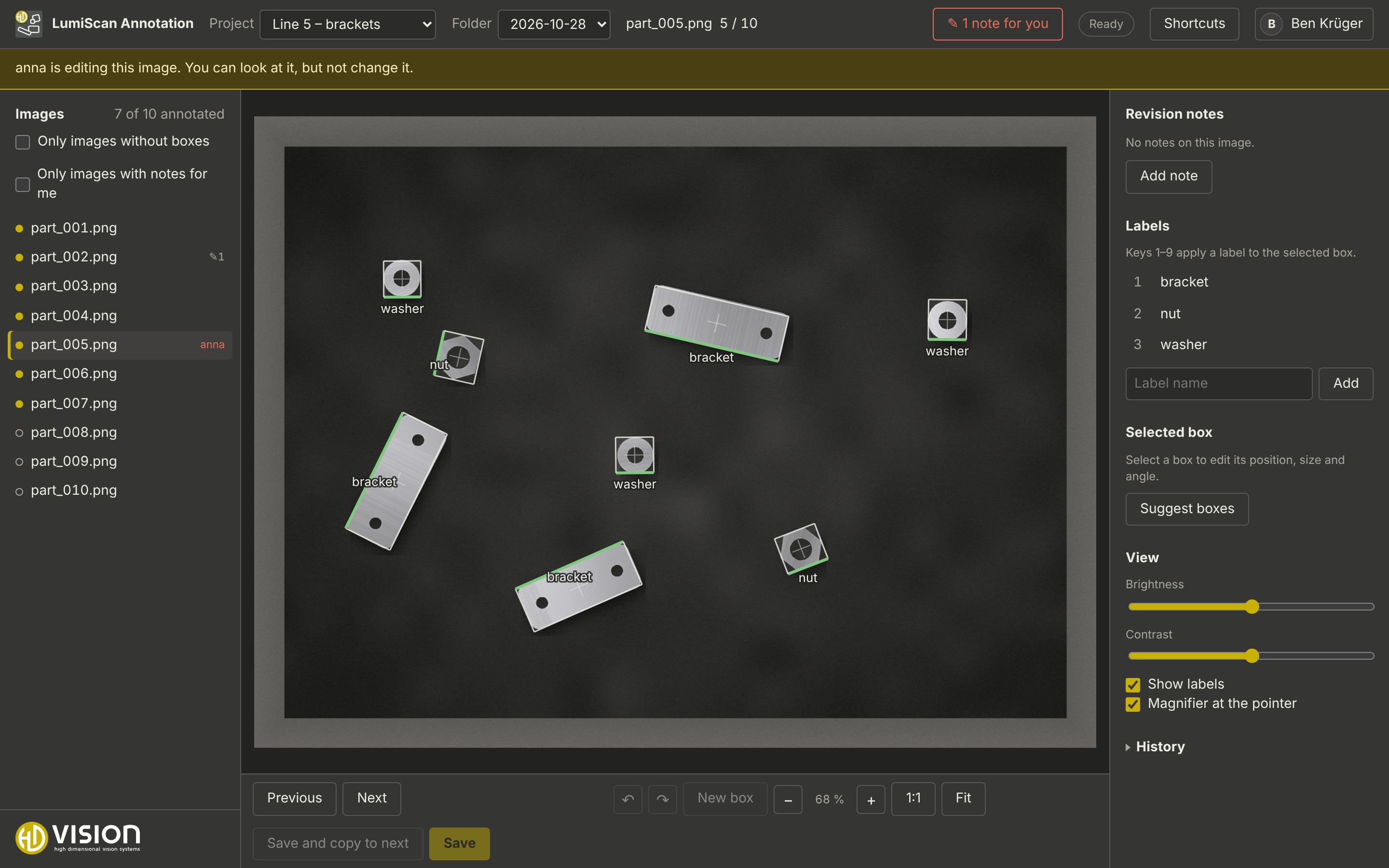
Opening an image takes an edit lock for you. While you have the image open, others can look at it but not change it: their view is read-only, with a banner naming you, and the image list shows your name in red next to the image.
-
The lock lasts 60 seconds and is renewed by your browser as long as the image is open. If the browser is closed or the network is gone, the lock ends by itself after that time.
-
Opening the same image in a second window of your own makes the other window read-only.
-
With several annotators per image, every annotator has their own lock on their own version: they can annotate the same image at the same time.
Conflicts
If the annotation file of an image was changed after you opened it, for example by the desktop tool on the same network folder or by another server on an S3 bucket, saving asks:
-
Load their version: discard your changes and show the other version,
-
Overwrite with mine: save your boxes anyway (the other version stays in the history),
-
Cancel: keep editing.
The server scans the project folders regularly (default every 60 seconds) and takes over changes made outside the web app into the history.