Several Annotators per Image
With Annotators per image set to 2 or more in the project settings, every image is annotated by that many people independently. The server compares their boxes. A step-by-step guide is in Check Annotations with Two Annotators.
Modes
Annotators see the mode Annotate, reviewers the mode Review and the Statistics. People with both roles switch at the top.
Annotate (blind)
-
Everyone draws their own version without seeing the others' boxes.
-
The versions are stored apart from the reference, in
<folder>/.annotations/<image>/<user>.tsv(same format as the CSV; training ignores them). -
Several people can annotate the same image at the same time.
-
The image list shows annotated / required (
1/2), and whether you have done it. Annotators see how many have annotated, not who. -
Only images I have not annotated yet filters the list.
Automatic consensus
When the last required annotator saves, the server compares all versions. They agree when
-
every object was drawn by everyone (nobody missed a box),
-
matching boxes overlap at least the set value (Agree: overlap ≥ %, default 85 %, measured as rotated intersection over union),
-
their angles differ less than the set limit (default 5°), with the bottom edge on the same side,
-
they have the same label.
Then the server writes the mean boxes as the reference annotation <image>.csv, the file training reads, with auto-consensus as the user in the .json history. Otherwise the image goes to review.
Boxes of different annotators are matched with an optimal assignment (Hungarian method) on the rotated overlap.
Review
-
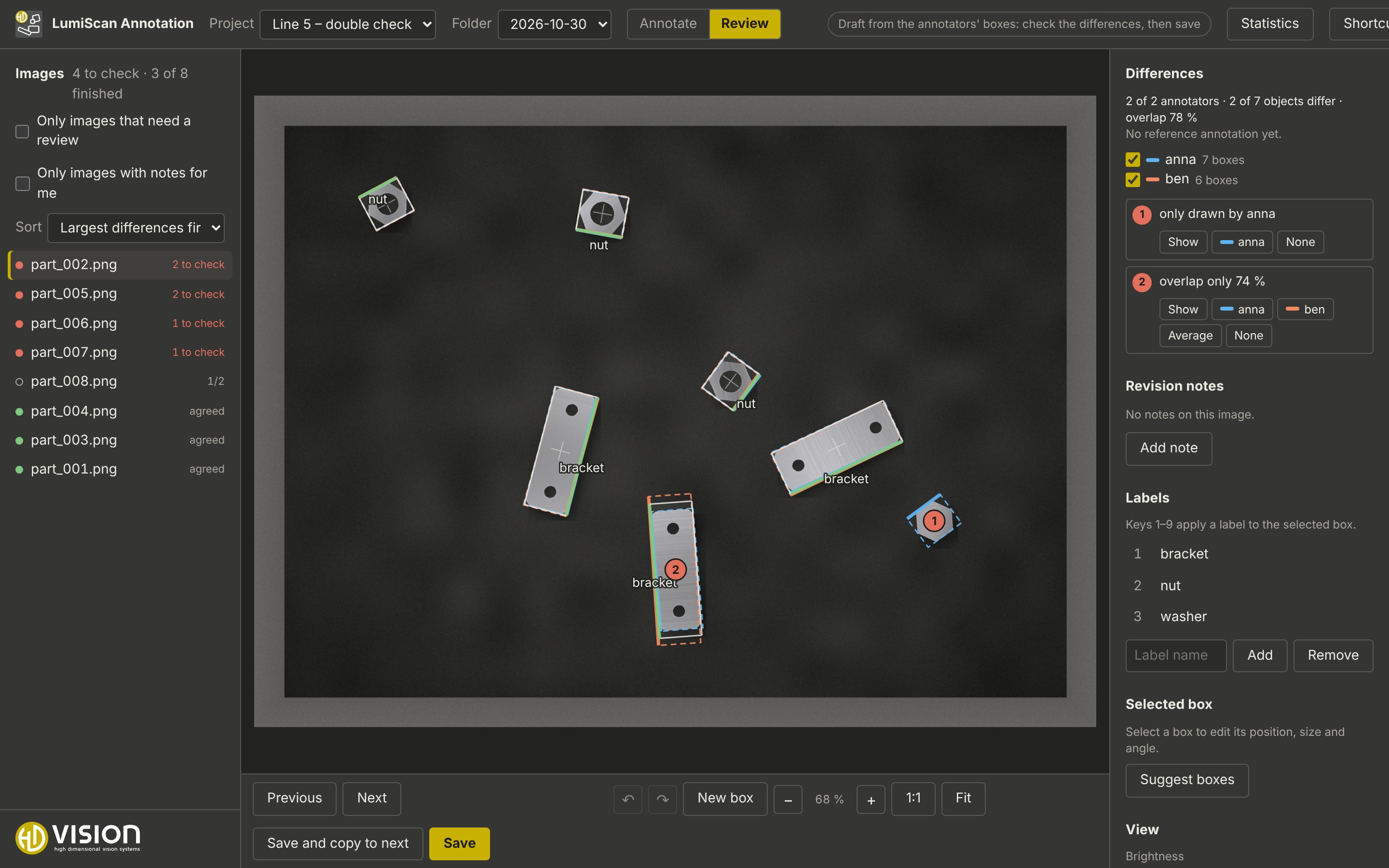
The image list shows the state of each image: open, to check, accepted (agreed automatically), done (reviewed). It is sorted by the largest differences first; Sort changes that.
-
Every annotator has a colour; the legend switches individual annotators on and off.
-
Red numbered markers show the differences: box missing for someone, overlap too small, angle, bottom edge on the other side, different label.
-
For each difference: Show zooms to it; the buttons take one person’s box, the Average or None into the reference.
-
The boxes in the editor can also be changed freely before saving.
-
Save writes the reference annotation.
.annotations/<image>/consensus.jsonrecords who decided. A reviewed reference is never overwritten automatically, also if an annotator saves again.
Statistics
Statistics shows the agreement for one folder or the whole project:
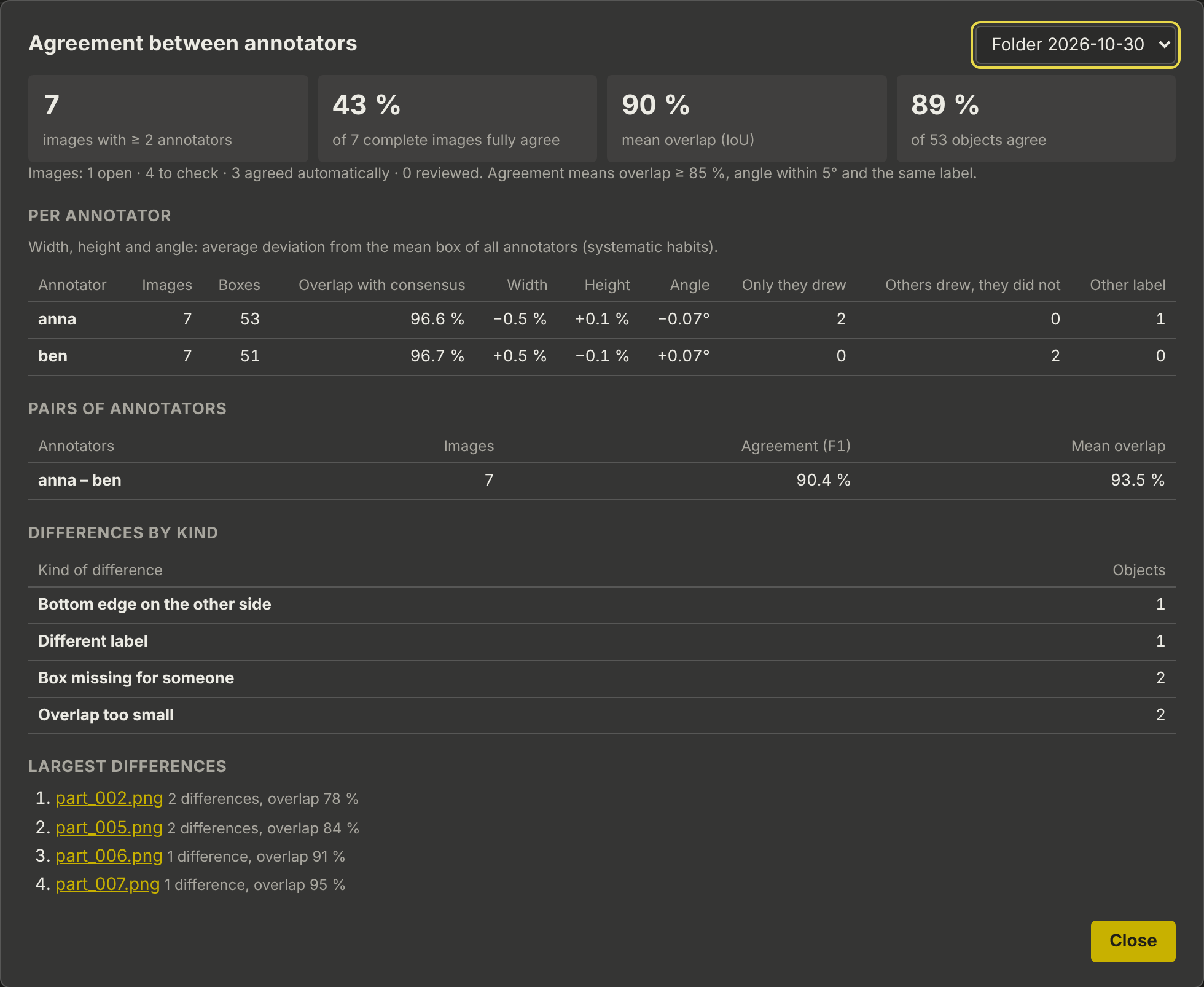
Summary |
Images with enough annotators, share of complete images that fully agree, mean overlap, share of objects that agree; images open, to check, agreed automatically, reviewed |
Per annotator |
Overlap with the consensus; systematic deviation of width, height and angle from the mean box; boxes only they drew, boxes they missed; other labels |
Pairs of annotators |
Agreement (F1) and mean overlap per pair |
Differences by kind |
How often each kind of difference occurs |
Largest differences |
The images with the most and largest differences; click to review |