Troubleshooting
This page describes known problems with LumiScan VGR, grouped by category. Start with the general checks: they explain where to find the information that the diagnostic steps use. Then find your symptom in the categories below and follow the steps of the entry.
General checks
-
Admin mode: Press Ctrl + Shift + A to switch admin mode on or off. The PROFINET tab (T2) and the Scene tab (T1) are only visible in admin mode. The admin controls (A2 to A14) are only active in manual mode. For PLC diagnostics, activate admin mode but do not activate manual mode: while manual mode is active, PLC-controlled processing is paused.
-
Status and return code: The result of each action is shown as a status message in the status window (S2), for example SUCCESS. For PROFINET, it is also shown as a number in
OUT_ReturnCodein the PROFINET tab. OPC UA methods return the code as the stringReturnCode. The meaning of each value is listed in PLC Settings: Status Information and in the FAQ. -
Operation mode: Most functions require the operation mode
AUTOMATIC(1). For PROFINET, the current mode is shown inOUT_OperationMode. For OPC UA,GetOperationModereturns it. -
Log files: Log files are stored in
<HDVAppData>\LumiScan VGR\logs, whereHDVAppDataisC:\Users\<UserName>\AppData\Local\HD Vision Systems GmbH. The log files rotate: each file has a maximum size of 10 MB, and at most five files are kept. The log window opens with S3. In debug mode (Ctrl + Shift + D, or the start option-d/--debug), the console shows the same detailed output that is written to the log file. If the application crashes, a memory dump is created in<HDVAppData>\LumiScan VGR. -
Camera: LumiScan VGR requires a LumiScanX camera connected to the IPC via Ethernet. The camera network, the Windows Firewall and the virus protection must be configured as described in the LumiScanX manual: Network Settings, Windows Firewall and Virus Protection.
-
Licence: For problems with the LumiScan Key or CodeMeter Runtime, see Licensing: Troubleshooting.
Start-up and camera
Problem: The camera is not recognized or no image is captured after start-up
After LumiScan VGR has started, the camera is not recognized and no image can be captured.
Trigger Camera (PROFINET) or CaptureImage (OPC UA) returns CAMERA_NOT_INITIALIZED (2).
-
The application has not been initialized (Setup). Automatic setup at start (
enableAutomaticSetup) is disabled by default. -
The camera was reset with the Reset Camera function, and Setup has not been executed again.
-
PROFINET: In the PROFINET tab (admin mode), check
OUT_IsSetup. Expected:1(system setup has been completed). -
OPC UA: Check that the client has called
SetupSystemat least once since the application started. Expected:SetupSystemreturnedSUCCESS. -
In the settings file, check
enableAutomaticSetupin thesystemsection. If it is missing orfalse(default), Setup is not executed automatically at start. -
Check whether the camera was reset since the last Setup (PROFINET: Reset Camera function with
IN_ResetCameraRequest; OPC UA:ResetCamera).
-
If the application has not been initialized: Run Setup before you capture an image:
-
PLC: Run the Setup function with
IN_SetupRequest. Check:OUT_IsSetupis1. -
OPC UA: Call
SetupSystem. Check: it returnsSUCCESS. -
User interface: Activate manual mode (M1), then initialize the application with A6 in admin mode.
-
After Setup, capture an image again. Check: the image is displayed in the Image tab (T0), and the status window (S2) shows SUCCESS.
-
-
If the camera was reset: Run Setup again as described above. After resetting the camera, Setup must be executed again.
-
If Setup should run automatically at start: Set
enableAutomaticSetuptotruein thesystemsection.
Send the information listed under Information for support to support, together with the return code of Trigger Camera or CaptureImage and the settings file.
Problem: Image capture fails with a camera return code
No images are acquired from the LumiScanX sensor system.
Trigger Camera (PROFINET) or CaptureImage (OPC UA) returns one of these codes:
-
CAMERA_NOT_CONNECTED(3): A connection to the camera could not be established. -
CAMERA_ACQUISITION_ERROR(4): An error occurred while communicating with or acquiring data from the camera. -
CAMERA_HARDWARE_TRIGGER_AGAIN(12): Auto-exposure was unsuccessful. -
CAMERA_BAD_EXPOSURETIME_SETTING(13): The requested exposure time cannot be reached. -
OPC UA only:
CAMERA_RESTART_REQUIRED: The camera driver or firmware requires a restart.
-
The camera hardware is not reachable, for example because of the cabling or the camera network.
-
Image acquisition failed because of an exposure, trigger or transport problem.
-
Auto-exposure did not reach a valid exposure.
-
The configured exposure range is too short or too long for the current lighting conditions.
-
The camera driver or firmware requires a restart.
-
Read the return code in the status window (S2), in
OUT_ReturnCode(PROFINET) or inReturnCode(OPC UA). Expected:SUCCESS(0). Note the code: it identifies the cause. -
Check the cabling of the LumiScanX camera. Expected: the camera is connected to the IPC via Ethernet.
-
Check the camera network as described in LumiScanX: Network Settings.
-
Open the log window (S3) and check the entries at the time of the capture.
-
For
CAMERA_HARDWARE_TRIGGER_AGAINorCAMERA_BAD_EXPOSURETIME_SETTING: Check the auto-exposure settings of the camera in thecamerassection. In debug mode, the yellow auto-exposure polygon in the Image tab shows the region used for the auto-exposure computation (polygon).
-
If the camera is not reachable (
CAMERA_NOT_CONNECTED):-
Check the cabling and the camera network as described in the LumiScanX manual.
-
Reset the camera: PROFINET: Reset Camera function (
IN_ResetCameraRequest, camera ID inIN_ParamArgString); OPC UA:ResetCamera(an empty string resets all cameras). -
Run Setup again. After resetting the camera, Setup must be executed again.
-
Capture an image. Check: the return code is
SUCCESS(0).
-
-
If image acquisition failed (
CAMERA_ACQUISITION_ERROR): Reset the camera and run Setup again as described above. If the error remains, check the LumiScanX documentation. -
If auto-exposure was unsuccessful (
CAMERA_HARDWARE_TRIGGER_AGAIN): Trigger the camera again (Trigger Camera orCaptureImage). Check: the return code isSUCCESS(0). -
If the exposure time cannot be reached (
CAMERA_BAD_EXPOSURETIME_SETTING): Check the auto-exposure settings, or contact HD Vision Systems. -
If a restart of the camera is required (
CAMERA_RESTART_REQUIRED, OPC UA): CallResetCamera.
Send the information listed under Information for support to support, together with the return code, the camera serial number and the cameras section of the settings file.
Problem: A timeout message appears or only a black image is captured, although the camera is detected
A timeout message appears. During capture, only a black image is displayed, although the connected sensor is detected and appears in the drop-down menu.
-
The Windows Firewall is not configured correctly and blocks the devices.
-
The virus protection blocks the devices.
-
Check the network configuration of the LumiScanX camera as described in LumiScanX: Network Settings.
-
Check the Windows Firewall settings as described in LumiScanX: Windows Firewall. Expected: the devices are not blocked by the firewall.
-
Check the virus protection settings as described in LumiScanX: Virus Protection.
-
If the Windows Firewall blocks the devices: Configure the Windows Firewall as described in the LumiScanX manual. Then capture an image again. Check: the image is not black, and no timeout message appears.
-
If the virus protection blocks the devices: Configure the virus protection as described in the LumiScanX manual, then capture an image again.
Send the information listed under Information for support to support, together with the exact timeout message and the camera serial number.
PLC communication (PROFINET)
Problem: LumiScan VGR does not respond after GripBestResult
The PLC has sent a GripBestResult request (IN_GripBestResultRequest), but the application does not return the expected result.
LumiScan VGR seems to hang.
The same procedure applies when LumiScan VGR does not respond to another PLC request, for example Trigger Camera, Compute Objects, Get Best Result, Set Parameter, Get Parameter or Setup.
Replace GripBestResult in the signal names below with the name of that function.
-
The PROFINET connection is interrupted.
-
The application is still executing the function.
-
The PLC handshake is incomplete, for example the PLC has not reset
IN_GripBestResultRequestto0, or has set it beforeOUT_GripBestResultReadywas1. -
The PLC has not set the request, for example because a condition in the PLC program is not met.
-
LumiScan VGR is not in the operation mode
AUTOMATIC. -
The application is in an unexpected internal state.
-
Verify the PROFINET connection. Activate admin mode with Ctrl + Shift + A. Do not activate manual mode. Open the PROFINET tab (T2). Expected: the tab shows the data currently exchanged with the PLC. Ask the PLC programmer whether the PLC still has a connection to LumiScan VGR.
-
Check the heartbeat signals. In the PROFINET tab, watch
IN_HeartBeatandOUT_HeartBeat. Expected: both blink red and green;OUT_HeartBeatfollowsIN_HeartBeat. If they do not blink, the PROFINET connection is lost. The PLC heartbeat is enabled withenableHeartbeatin thesystemsection (defaulttrue). -
Verify the request and response signals. In the PROFINET tab, check the signals and compare them with Table 5: PLC Data Transmission Process:
-
OUT_OperationMode: expected1(AUTOMATIC). -
OUT_Error: expected0;1means that LumiScan VGR is in an error state. -
Before the request:
OUT_GripBestResultReadyis1andOUT_GripBestResultRunningis0. -
After the PLC has set
IN_GripBestResultRequestto1(shown as True, green):OUT_GripBestResultReadychanges to0andOUT_GripBestResultRunningto1. IfIN_GripBestResultRequeststays False, LumiScan VGR has not received the request. -
The PLC then resets
IN_GripBestResultRequestto0. LumiScan VGR executes the function only after the request is back at0. -
When the function is finished:
OUT_GripBestResultRunningis0andOUT_GripBestResultReadyis1. -
If the PLC considers the last step as not finished: check that
OUT_SetParameterReady,OUT_TriggerCameraReady,OUT_ComputeObjectsReady,OUT_GetBestResultReady,OUT_GripBestResultReadyandOUT_GetParameterReadyare1, and thatOUT_SetParameterRunning,OUT_TriggerCameraRunning,OUT_ComputeObjectsRunning,OUT_GetBestResultRunning,OUT_GripBestResultRunningandOUT_GetParameterRunningare0. -
Note the handshake step at which the signals stop changing.
-
-
Inspect the application logs. Open the log window (S3), or open the log file
LumiScanVGR.login<HDVAppData>\LumiScan VGR\logs. Search forPLC - Procedure "GripBestResult" calledandPLC - Procedure "GripBestResult" finished. Expected: both entries exist for the time of the request. Ifcalledis missing, the function was not called by the PLC. Ifcalledexists butfinishedis missing, the function has not finished.Possible function names in these entries:
TriggerCamera,ComputeObjects,GetBestResult,GripBestResult,SetParameter,GetParameter,Setup. -
Record the return code. After
OUT_GripBestResultRunninghas changed to0, readOUT_ReturnCodein the PROFINET tab and the status message in the status window (S2). Expected:0(SUCCESS) or10(RESULTS_EMPTY). For10, see Problem:RESULTS_EMPTYis returned. For other values, see Table 6: Return Values.
-
If the PROFINET connection is interrupted (
IN_HeartBeatandOUT_HeartBeatdo not blink):-
Ask the PLC programmer to check the PROFINET connection on the PLC side.
-
If
enableHeartbeatis set tofalsein thesystemsection, set it totrueand start LumiScan VGR again with the changed settings file. -
Check:
IN_HeartBeatandOUT_HeartBeatblink red and green again. -
Send the request again, starting with step 1 of the handshake.
-
-
If the application is still executing (
OUT_GripBestResultRunningis1, the request is back at0, and the log containscalledbut not yetfinished): Wait untilOUT_GripBestResultRunningis0. Then check the return code and read the output variables (handshake steps 14 to 16). Check: the log containsPLC - Procedure "GripBestResult" finished. -
If the PLC handshake is incomplete: Make sure that the PLC program follows the handshake:
-
Wait until
OUT_GripBestResultReadyis1. -
Set
IN_GripBestResultRequestto1. -
Wait until
OUT_GripBestResultReadyis0, and check thatOUT_GripBestResultRunningis1. IfOUT_GripBestResultRunningdoes not become1, the trigger is discarded; start again with step 1. -
Set
IN_GripBestResultRequestto0. -
Wait until
OUT_GripBestResultRunningis0, check the return code and read the output variables.Check:
OUT_GripBestResultReadyis1again, andOUT_ReturnCodeis0or10.
-
-
If the PLC has not set the request (
IN_GripBestResultRequeststays False in the PROFINET tab, and the log contains nocalledentry): Ask the PLC programmer to check whether the PLC program has an unmet condition for setting the request, whether the PLC is waiting for a signal, and whether a PLC-internal check that is not related to LumiScan VGR blocks the process (for example a robot error or a cylinder error). Check:IN_GripBestResultRequestchanges to True (green) in the PROFINET tab. -
If LumiScan VGR is not in the operation mode
AUTOMATIC: See Problem: The PLC cannot start any functions after manual mode. -
If the application is in an unexpected internal state: If the PLC sets the request to True, but the PROFINET tab still shows it as False, LumiScan VGR has an internal error due to execution concurrency. If
OUT_Erroris1, LumiScan VGR is in an error state. In both cases, inform HD Vision Systems and send the information listed below.
Send the information listed under Information for support to support, together with:
-
the software version (Ctrl + Shift + V) and the operating system of the IPC,
-
the relevant logs: the exported log file
LumiScanVGR.logthat covers the time of the request, -
the date and time of the error,
-
the communication status: a screenshot of the PROFINET tab in admin mode, the values of
OUT_ReturnCode,OUT_OperationModeandOUT_Error, and, if possible, the saved status of the PLC variables, -
the handshake step at which the PLC or LumiScan VGR stops,
-
whether the PLC still has a connection to LumiScan VGR, whether the PLC is waiting for signals, and whether the PLC has already set the request signal,
-
whether the PLC has internal checks or process status checks that are not related to LumiScan VGR (for example a robot error or a cylinder error).
Problem: The PLC cannot start any functions after manual mode
After manual mode has been used, the PLC can no longer start processing functions.
OUT_OperationMode shows 2 (MANUAL) while manual mode is active, or 0 (IDLE) after manual mode has been exited.
-
Manual mode is still active. While manual mode is active, PLC-controlled processing is paused.
-
Manual mode has been exited. The system then changes to
IDLE(0), in which only parameter-setting functions are available.
-
In the PROFINET tab (admin mode), check
OUT_OperationMode. Expected:1(AUTOMATIC). -
In the user interface, check whether manual mode is active. Manual mode is active when the manual controls (M2) and the workflow steps M3 to M6 are displayed.
-
If manual mode is still active: Exit manual mode in the user interface. The PLC cannot switch the system out of manual mode. The system then changes to
IDLE(0); continue with the next step. -
If the system is in
IDLE: Set the operation mode back toAUTOMATICfrom the PLC with the Set Parameter function:-
Set
IN_ParamIdto0(SET_OPERATION_MODE) andIN_ParamArgByteto1(AUTOMATIC). -
Run Set Parameter with
IN_SetParameterRequest, following the handshake (Table 5). -
Check:
OUT_ReturnCodeis0, andOUT_OperationModeis1.
-
Send the information listed under Information for support to support, together with the values of OUT_OperationMode and OUT_ReturnCode after Set Parameter.
OPC UA
Problem: OPC UA calls fail with BadTimeout or BadResourceUnavailable
A method call fails on the client with BadTimeout or a transport disconnect, or it is rejected with BadResourceUnavailable.
-
The client method call timeout is too short. Many methods take significantly longer than standard PLC operations; the typical execution time is 3 to 10 seconds. Default SDK timeouts (often 2 to 5 seconds) are too short.
-
Another client is currently executing a method, or the client calls methods in parallel. The server processes one method at a time; parallel calls are rejected with
BadResourceUnavailable.
-
Check the method call timeout configured in the OPC UA client. Expected: at least 15 seconds.
-
Check whether the client calls methods in parallel, and whether a second client is connected (at most 2 clients can be connected at the same time). Expected: only one method is executed at a time.
-
If the call timeout is too short: Set the client method call timeout to at least 15 seconds. Check: the method returns a
ReturnCodeinstead ofBadTimeout. -
If another client is executing a method, or methods are called in parallel: Do not call methods in parallel. If another client is executing a method, wait and retry. Check: the call is no longer rejected with
BadResourceUnavailable.
Send the information listed under Information for support to support, together with the method that fails, the error reported by the client and the configured client timeouts.
Problem: OPC UA methods return OPERATION_MODE_INVALID
OPC UA methods return OPERATION_MODE_INVALID.
Only SetOperationMode and GetOperationMode are accepted.
-
The server is not in the operation mode
AUTOMATIC, for example because it is inIDLEorMANUAL(local or user-interface control active).
-
Call
GetOperationMode. Expected:Modeis1andModeNameisAUTOMATIC.
-
If the server is not in
AUTOMATIC: CallSetOperationModewith the value1(AUTOMATIC), then retry the method. Check:GetOperationModereturns1, and the method no longer returnsOPERATION_MODE_INVALID.
Send the information listed under Information for support to support, together with the result of GetOperationMode and the ReturnCode of SetOperationMode.
Problem: CameraTemperature is -273.1528
GetCameraTemperature returns -273.1528 in CameraTemperature.
-
The camera does not report a temperature.
-
Check the value of
CameraTemperature.-273.1528means that the value is unavailable; it is not a physical reading.
-
If the camera does not report a temperature: Treat the value as "unavailable", not as a measured temperature.
Contact support with the information listed under Information for support.
Problem: Shutdown has no effect
After a call of the OPC UA method Shutdown, LumiScan VGR keeps running.
-
Remote shutdown is not yet implemented.
Shutdownis a placeholder and has no effect on the running process.
-
Check on the host machine whether the LumiScan VGR process is still running after the
Shutdowncall. Expected: it is still running;Shutdownhas no effect.
-
If remote shutdown is required: Stop the server process on the host machine.
Contact support with the information listed under Information for support.
Configuration and detection results
Problem: RESULTS_EMPTY is returned
Get Best Result or Grip Best Result (PROFINET), or GetBestResult or GripBestResult (OPC UA), returns RESULTS_EMPTY (10): no valid grip points are available for the active robot.
In manual mode, the status changes to RESULTS_EMPTY after DONE (M6); no confirmation is displayed and no training data is exported.
-
The objects have not been computed yet.
-
All candidates of the last detection have already been consumed. Each Grip Best Result call returns the next candidate.
-
No objects have been detected (object count
0). -
The 3D information is invalid, for example because of a poor point cloud or an incorrect configuration.
-
Check that Compute Objects (PROFINET) or
ComputeObjects(OPC UA) was executed after the last image capture. Expected: it returnedSUCCESS. -
Check the number of objects:
-
PROFINET:
OUT_NumObjectsis the number of objects in the scene that have not yet been gripped. With Get Parameter,IN_ParamId0(GET_NUM_OBJECTS_2D_TOTAL) returns the total number of objects detected in 2D, and1(GET_NUM_OBJECTS_3D_TOTAL) the number of 3D-detected objects that have not yet been gripped. -
OPC UA:
ComputeObjectsreturnsNumObjects2DandNumObjects3D;GetReportwithParamId0or1returns the totals.
-
-
Compare the object counts. If no objects have been detected in 2D, see Problem: No objects are detected (object count is
0). If objects have been detected but none is left to grip, all candidates have been consumed. -
In admin mode, open the Scene tab (T1). Enable Show Cloud (Sc3) to display the point cloud, and Show Grip Candidates (Sc4, with Show Origin disabled) to display the grip candidates. Expected: the point cloud covers the objects, and grip candidates are displayed.
-
If the objects have not been computed, or all candidates have been consumed: Capture a new image and compute the objects again (PROFINET: Trigger Camera and Compute Objects; OPC UA:
CaptureImageandComputeObjects). Check: Get Best Result returnsSUCCESS(0). -
If no objects have been detected: See Problem: No objects are detected (object count is
0). -
If the 3D information is invalid: Check the point cloud in the Scene tab, and check the configuration of the active camera, pipeline and robot in the settings file.
Send the information listed under Information for support to support, together with the object counts and the recorded data of the capture (see Generated Data and Files).
Problem: No objects are detected (object count is 0)
After Compute Objects, the object count is 0: OPC UA ComputeObjects returns NumObjects2D and NumObjects3D as 0, or PROFINET Get Parameter GET_NUM_OBJECTS_2D_TOTAL returns 0 in OUT_NumObjects.
The Image tab (T0) shows no detection results.
-
The camera placement or the lighting does not allow the objects to be detected.
-
The objects are outside the region of interest (ROI), the purple rectangle in the Image tab in which the network searches for objects.
-
The wrong pipeline is active, or the pipeline configuration does not match the objects.
-
The neural network does not yet provide sufficiently robust detection results for the objects.
-
In the Image tab (T0), check the captured image. Expected: the objects are visible and lie inside the purple ROI rectangle.
-
Check the active pipeline. OPC UA: read
ActivePipeline. Expected: the pipeline that is configured for these objects. -
Check the pipeline configuration in the
pipelinessection of the settings file. Expected: the pipeline contains the objects to be detected.
-
If the camera placement or the lighting is not suitable: Correct the camera placement or the lighting, then capture an image and compute the objects again. Check: the object count is greater than
0. -
If the objects are outside the ROI: Place the objects inside the ROI, or correct the ROI of the pipeline in the settings file.
-
If the wrong pipeline is active: Select the correct pipeline before you compute the objects (PROFINET: Set Parameter with
IN_ParamId2=SET_PIPELINE_ID, ID inIN_ParamArgString; OPC UA:SetActivePipeline). -
If the detection is not robust enough: Use manual mode to correct the detected objects and labels and to create new training data.
Send the information listed under Information for support to support, together with the captured image and the pipelines and objects sections of the settings file.
Problem: No point cloud matching can be performed
No point cloud matching can be performed: the generated point cloud is not compared with the 3D models of the objects.
-
The HALCON licence is not installed.
-
The HALCON installation is not part of the
PATHenvironment variable.
-
Check that a valid HALCON licence is installed on the IPC.
-
In PowerShell, display the
PATHenvironment variable. Expected: it contains the absolute path to the HALCONbindirectory.
-
If the HALCON licence is not installed: Install a valid HALCON licence.
-
If the HALCON installation is not in
PATH: Add the absolute path to the HALCONbindirectory to thePATHenvironment variable. Check: in PowerShell,PATHcontains this directory.
Send the information listed under Information for support to support, together with the content of the PATH environment variable.
Problem: A function returns ID_DOES_NOT_EXIST
Selecting a camera, pipeline, robot or recipe returns ID_DOES_NOT_EXIST (8): PROFINET Set Parameter with SET_CAMERA_ID, SET_PIPELINE_ID or SET_ROBOT_ID, or OPC UA SetActiveCamera, SetActivePipeline, SetActiveRobot, ExecuteSimpleRecipe or ExecuteRecipe.
-
The camera, pipeline, robot or recipe ID is not configured in the settings file.
-
OPC UA: the ID was added or changed in the configuration after the server started. The arrays
PossibleCameras,PossiblePipelinesandPossibleRobotsare filled at server startup.
-
Compare the ID with the
identries in thecameras,pipelinesandrobotssections of the settings file, and with the recipe IDs in the project configuration. Expected: the ID matches exactly. -
PROFINET: In the PROFINET tab, check
IN_ParamIdandIN_ParamArgString. Expected:IN_ParamArgStringcontains the ID. -
OPC UA: Read
PossibleCameras,PossiblePipelinesorPossibleRobots. Expected: the ID is listed.
-
If the ID is not configured: Use an ID that is configured, or add the component to the settings file. Check: the function returns
SUCCESS(0). -
If the ID was added or changed after the server started: Restart the server so that it picks up the new configuration. Check: the ID is listed in the
Possible*arrays.
Send the information listed under Information for support to support, together with the ID used and the settings file.
Problem: A function returns MISSING_TRANSFORM
A function returns MISSING_TRANSFORM (9): the required coordinate transformation is not available.
-
Hand-eye calibration data is missing for the active robot-camera pair.
-
Check which camera and robot are active (OPC UA: read
ActiveCameraandActiveRobot; PROFINET: the IDs last set withSET_CAMERA_IDandSET_ROBOT_ID). -
In the
robotssection of the settings file, checkcameraToRobotof the active robot. Expected: it contains an entry for the active camera ID with a valid 4x4 transformation matrix.
-
If the hand-eye calibration data is missing: Add the hand-eye transformation for the camera ID to
cameraToRobotof the robot, or select a robot-camera pair for which hand-eye calibration data exists. Check: the function returnsSUCCESS(0).
Send the information listed under Information for support to support, together with the robots section of the settings file.
Hand-eye calibration
These problems occur in LumiScan Hand-Eye Calibration. The Pose Status of each captured image is shown in the image list on the Hand-Eye tab.
Problem: Pose Status shows "Can not be interpreted"
After capture, Pose Status shows the message Can not be interpreted.
-
The position read out by the PLC appears to be wrong because the PLC is not used for Pose Mode.
-
LumiScan Hand-Eye Calibration is not connected to the PLC.
-
The cifX card name is wrong.
-
On the Setup tab, check Pose Mode. Expected:
SPS(the PLC is used for Pose Mode). -
On the PROFINET tab, check the message area. Expected: no connection error message. If a message such as
Hilscher card not connected!is shown, the connection to the PLC has not been established.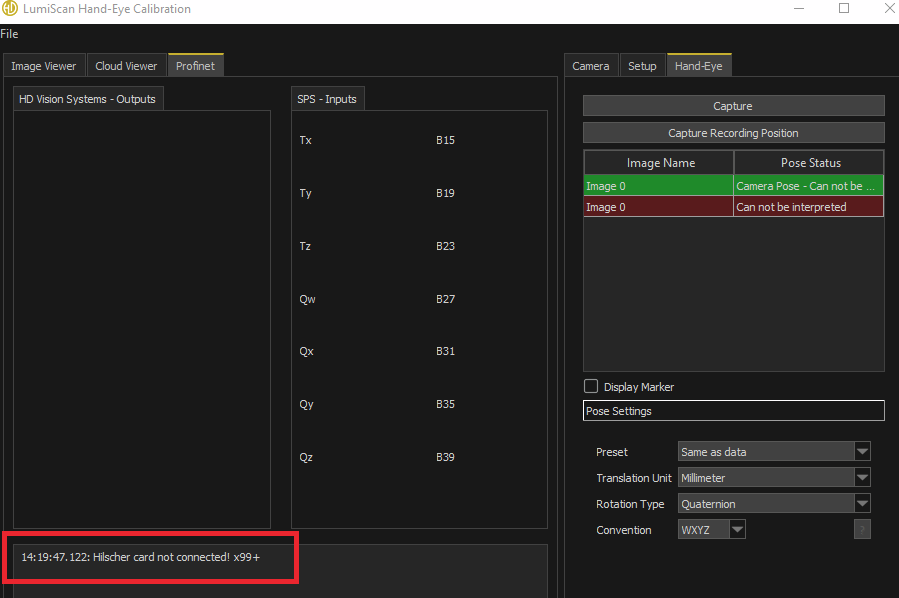
-
On the Setup tab, check CifX Card Name in the SPS Layout group. Expected: the name of the Hilscher card, normally
cifx0;0if you have only one Hilscher card.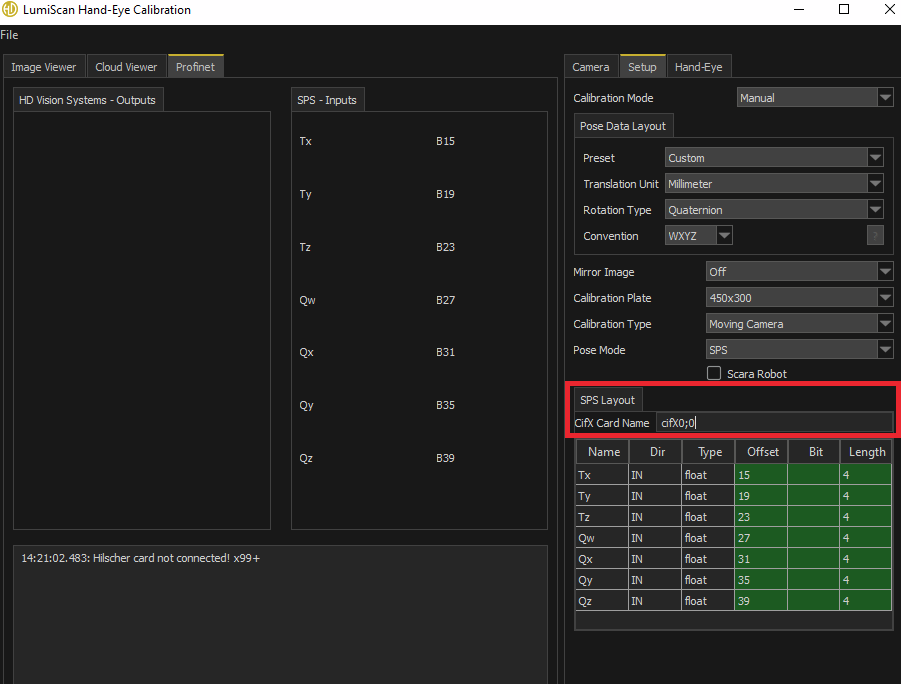
-
If the PLC is not used for Pose Mode: Set Pose Mode to
SPS, then capture again. Check: Pose Status no longer showsCan not be interpreted. -
If LumiScan Hand-Eye Calibration is not connected to the PLC: Establish the connection to the PLC. Check: the PROFINET tab shows no connection error message. Then capture again.
-
If the cifX card name is wrong: Enter the correct card name in CifX Card Name (normally
cifx0;0with one Hilscher card). Check: the PROFINET tab shows no connection error message. Then capture again.
Send the information listed under Information for support to support, together with screenshots of the Setup and PROFINET tabs.
Problem: Pose Status shows "Bad pose quality."
After capture, Pose Status shows the message Bad pose quality.
-
The program cannot detect the pattern of the calibration plate well. This can lead to a poor calibration.
-
On the Hand-Eye tab, check the Pose Status of each image in the image list. Note the images that show
Bad pose quality.
-
If the pattern is not detected well:
-
Delete the image.
-
Change the orientation of the calibration plate.
-
Capture a new image. Check: Pose Status of the new image does not show
Bad pose quality.
-
Send the information listed under Information for support to support, together with a screenshot of the Hand-Eye tab.
Problem: No image is added after capture
After capture, no image is added to the image list.
-
The calibration pattern is not found.
-
Check whether the image is overexposed or underexposed (too bright or too dark).
-
Check that the camera can see the pattern points on the calibration plate.
-
If the calibration pattern is not found:
-
Correct the exposure if the image is too bright or too dark.
-
Make sure that the camera can see the pattern points on the plate.
-
Change the orientation of the calibration plate.
-
Capture again. Check: the image is added to the image list.
-
Send the information listed under Information for support to support, together with a captured image of the calibration plate.
Problem: The calibration result is very poor
The calibration result is very poor, for example T:Max > 0.02 (the limit depends on the application).
The dialog Success shows the calibration error as RMS and MAX values for T and R:
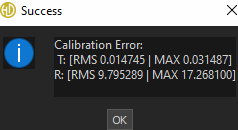
-
Too many or too few calibration images have been captured.
-
The calibration plate is too far away from the camera.
-
The viewing angles of the calibration images differ too little.
-
Count the captured calibration images. Expected: between 6 and 15 images.
-
Check whether the captured images match the recommended orientation of the calibration plate.
-
Check that the viewing angles of the images differ clearly, and that the plate is not too far away from the camera.
-
If too many or too few images have been captured: Capture between 6 and 15 images.
-
If the plate is too far away from the camera: Move the calibration plate closer to the camera and capture the images again.
-
If the viewing angles differ too little: Capture the images at clearly different viewing angles, in the recommended orientations of the calibration plate.
After the calibration, check the calibration error in the dialog Success. Expected: it is within the limit of your application.
Send the information listed under Information for support to support, together with a screenshot of the dialog Success and the number of images captured.
Information for support
Send this information to support:
-
Software version: Press Ctrl + Shift + V to display the build version, or start LumiScan VGR with
-v/--version. Via OPC UA, readVersion,GitRevisionandBuildTimeunderLumiScanVGR/Version. -
Operating system: The Windows version of the IPC (LumiScan VGR requires Windows 11), and the installed NVIDIA GPU, CUDA and cuDNN versions.
-
Logs: The log files from
<HDVAppData>\LumiScan VGR\logs(LumiScanVGR.log), and the memory dump from<HDVAppData>\LumiScan VGRif the application crashed.HDVAppDataisC:\Users\<UserName>\AppData\Local\HD Vision Systems GmbH. -
Diagnostic information: S4 collects diagnostic information about the application; the collected data can be encrypted and sent to HD Vision Systems. To include camera data, enable Camera png and Camera ply under Export in Admin Settings (A1) first.
-
Time of the error: The date and time at which the error occurred.
-
Communication status:
-
PROFINET: a screenshot of the PROFINET tab in admin mode, the values of
OUT_ReturnCode,OUT_OperationModeandOUT_Error, and, if possible, the saved status of the PLC variables. -
OPC UA: the method called, its
ReturnCodeor the error reported by the client (for exampleBadTimeout), and the result ofGetOperationMode.
-
-
Configuration: The JSON settings file that was loaded at start.
-
Messages and serial numbers: The exact message from the status window or the log, a screenshot, the camera serial number and, for licence problems, the serial number of the LumiScan Key.
Contact HD Vision Systems customer success at customer.success@hdvisionsystems.com or +49 6221 6721905. For licences, contact licenses@hdvisionsystems.com.